Welcome to the Onshape forum! Ask questions and join in the discussions about everything Onshape.
First time visiting? Here are some places to start:- Looking for a certain topic? Check out the categories filter or use Search (upper right).
- Need support? Ask a question to our Community Support category.
- Please submit support tickets for bugs but you can request improvements in the Product Feedback category.
- Be respectful, on topic and if you see a problem, Flag it.
If you would like to contact our Community Manager personally, feel free to send a private message or an email.
Onshape Benchmark (UNOFFICIAL) - Fill out to see your results!
 MichaelPascoe
Member Posts: 2,803 PRO
MichaelPascoe
Member Posts: 2,803 PRO
Onshape Benchmark Sheet (UNOFFICIAL)
This is the Unofficial Onshape Benchmark. This was created so that we can compare our systems and see which ones are the very best for Onshape. There are several types of results; the "Open Division" is for everyone to participate in, the "Closed Division" will be strict tests where only one variable is changing at a time in order to obtain pure data. I would love to add more entries to the open division is anyone is willing to participate.Your benchmark sheet includes a live chart which is linked to the Open Division records.
If you send me your Benchmark sheet, I will add it to the records!

Results
Up to date results for the Open Division can be found here. This will be updated as more records are posted in this discussion.Open Division - Onshape Benchmark - Results
Closed Division - Onshape Benchmark GPU - Results
Special thanks to:
@alnis for providing the assembly studio@Jason_S for walking me through Onshape technical info
@JD for letting me use those graphics cards for the GPU tests
How to use the Onshape Benchmark Sheet (UNOFFICIAL)
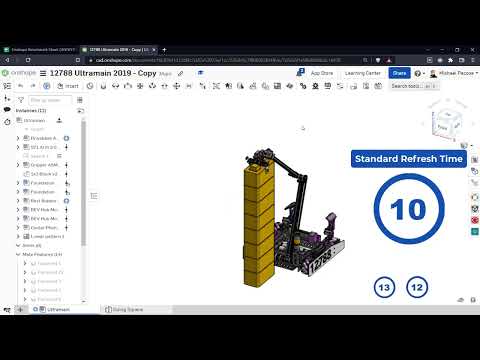 https://www.youtube.com/watch?v=SzhkG_qmItc
RENDERCAD
rendercad.ai - Photorealistic product rendering.
▚▞▚▞▚▞▚▞▚
________________________________________________________________________
Tagged:
3
Comments
Here are some closed division tests that would be good to do:
RENDERCAD
rendercad.ai - Photorealistic product rendering.
▚▞▚▞▚▞▚▞▚
________________________________________________________________________
New results are available for download speeds. This was a closed division test, maintaining steady upload speed and latency for each test. See the link below for more details:
Download Speed - Closed Division - Onshape Benchmark - Results
Edit: The table in the results sheet, below the chart, also shows the AWS-3 server speeds at the time of the test.
RENDERCAD
rendercad.ai - Photorealistic product rendering.
▚▞▚▞▚▞▚▞▚
________________________________________________________________________
It's interesting to see that there is almost no benefit to more bandwidth beyond 10Mbps
The table in the results sheet, below the chart, also shows the AWS-3 server speeds at the time of the test. In that same table, you can click on the link to the data sheet where the benchmark sheet of each of those recordings.
Upload and latency test coming soon..
RENDERCAD
rendercad.ai - Photorealistic product rendering.
▚▞▚▞▚▞▚▞▚
________________________________________________________________________
https://docs.google.com/spreadsheets/d/1R0fZ4pzEVtq6vMES8ey6lCFOfNff0uFTXzOCO1MzNnE/edit?usp=sharing
I have a 4K screen and if that's of any interest for closed testing.
Your results have been added to the Open Division records.
Congrats! Your setup is currently the fastest Onshape pc on record.
RENDERCAD
rendercad.ai - Photorealistic product rendering.
▚▞▚▞▚▞▚▞▚
________________________________________________________________________
Why do copy operations take so long in this test? Is information passed through the client and back to the servers or is that still a time intensive operation server to server?
It did seem like it could be the most repeatable number, if it really does force the server to recalculate everything. I don't fully understand though, because copying a document still doesn't re-calculate some of the features. If it did, it would take much longer. I would like a way to hard refresh the entire tree and every feature. This isn't possible on our end unless we change a value in each feature.
RENDERCAD
rendercad.ai - Photorealistic product rendering.
▚▞▚▞▚▞▚▞▚
________________________________________________________________________
Your results have been added to the Open Division records.
RENDERCAD
rendercad.ai - Photorealistic product rendering.
▚▞▚▞▚▞▚▞▚
________________________________________________________________________
Keep in mind this test is only looking at document load times. I would imagine having a better card may help with dragging things around in an assembly, "dragability". I'm not sure how to test dragability in a reliable way. Any ideas?
Perhaps I could record a mouse macro that drags at a consistent speed then monitor the fps. That might work for a closed division run.
RENDERCAD
rendercad.ai - Photorealistic product rendering.
▚▞▚▞▚▞▚▞▚
________________________________________________________________________
Update!
The Comparison Tool will help you compare any two data sheets from the Open Division records.RENDERCAD
rendercad.ai - Photorealistic product rendering.
▚▞▚▞▚▞▚▞▚
________________________________________________________________________
I figured I'd throw in a comparison from an Onshape developer's machine. Here's results from our standard issue Macbook Pro, tested from our Seaport office:
https://docs.google.com/spreadsheets/d/1P12CM2Ih2fT6ya91LhlfPNUemnZllRojamcMVRYsISg/edit#gid=0
All in all not far from the average! That's some validation in not showing hyper-fitting to our own setup. In theory, once basic needs are met, things like copy and refresh times in Onshape's architecture are going to be mostly independent of client hardware.
RENDERCAD
rendercad.ai - Photorealistic product rendering.
▚▞▚▞▚▞▚▞▚
________________________________________________________________________
Note that this is testing the generic download speed with speedtest.net. AWS speeds, upload, and ping are also listed in the table, but are not the focus of this specific closed division test.
Download Speed - Closed Division - Onshape Benchmark - Results
RENDERCAD
rendercad.ai - Photorealistic product rendering.
▚▞▚▞▚▞▚▞▚
________________________________________________________________________
By changing the size of the sphere and the magnitude (quantity), we get the following results:
Note that regeneration times vary greatly depending on if you have simple spheres vs a complex part with many shapes. More difficult shapes seem to affect regen time grater, even if they have less triangles than a simple large sphere.
Summary:
Keep your models efficient. Once your document starts to slow due to inefficient modeling, it may slow exponentially.Don't be a noob, follow each of the Self Paced Learning Pathways so that you are modeling like an Onshape pro.
RENDERCAD
rendercad.ai - Photorealistic product rendering.
▚▞▚▞▚▞▚▞▚
________________________________________________________________________
Simon Gatrall | Product Development, Engineering, Design, Onshape | Ex- IDEO, PCH, Unagi, Carbon | LinkedIn
RENDERCAD
rendercad.ai - Photorealistic product rendering.
▚▞▚▞▚▞▚▞▚
________________________________________________________________________
Thanks for the info @kdee122! I've added your results to the Open Division - Onshape Benchmark - Results.
RENDERCAD
rendercad.ai - Photorealistic product rendering.
▚▞▚▞▚▞▚▞▚
________________________________________________________________________
We have a new leader for the assembly benchmark time open division.
Surprisingly, part studio benchmark time was worse for this device than the previous leader.
.
.
.
.
.
.
.
.
.
.
RENDERCAD
rendercad.ai - Photorealistic product rendering.
▚▞▚▞▚▞▚▞▚
________________________________________________________________________