Welcome to the Onshape forum! Ask questions and join in the discussions about everything Onshape.
First time visiting? Here are some places to start:
- Looking for a certain topic? Check out the categories filter or use Search (upper right).
- Need support? Ask a question to our Community Support category.
- Please submit support tickets for bugs but you can request improvements in the Product Feedback category.
- Be respectful, on topic and if you see a problem, Flag it.
If you would like to contact our Community Manager personally, feel free to send a private message or an email.
Custom Feature: Cable/Wire Routing
Comments
-
I can confirm the clip direction works again, thanks for that!
However it also looks like multiple routes created by the same feature are now lumped into a single composite, which is different from the previous behavior… Was that intentional?0 -
Not necessarily intentional but it’s something I would suspect is right that if you add multiple wires to the same feature they should be grouped? Send me a DM with an example (or support ticket).
Senior Director, Technical Services, EMEA0 -
I have used a single feature to create "related" routes (just like you can use a single feature to create a bunch of wire refs or even insert multiple connectors) but looking back that's probably not "best practice". The single composite makes sense from a physical positioning/grouping of the routes but if the routes are meant to represent different part numbers it does mess up the BOM.
It comes down a bit to the intended BOM/release management side of things, I am not super clear on the "vision" for this feature set (in terms of linking the "shaped" harness in the assembly, the straightened route/drawing and the harness BOM)…
I don't have a good reason to say it shouldn't group them in a single composite other than "I've used the feature in a way that generates multiple part numbers so this update breaks my workflow". That said, just because I've done it that way a number times doesn't mean it's the "right" way to do it. If the intent is to use a separate feature for each part number, I will do this going forward and there is no need to force the feature to behave that way!
I was just asking if the change in behavior was intentional in case it was a "bug"…1 -
I did change it in anticipation of the next release, which required some clever grouping of connectors and harnesses, but I can look to change it back. To be honest, I didn't give the change much consideration.
Senior Director, Technical Services, EMEA0 -
I'm curious how people manage the wiring features to model cables running through drag chains. As much as it would be amazing to have something that fully articulates, we're ok with just modeling it statically at one extreme of the motion.
Do you model a dummy drag chain with a sketch that is used as a dummy clip path? Any special tricks?
Simon Gatrall | Product Development, Engineering, Design, Onshape | Ex- IDEO, PCH, Unagi, Carbon | LinkedIn
0 -
What we do:
- Model the drag chain or import COTS model.
- Sketch a guide curve, and convert to wire body. Or use routing curve, or any other wire-creation tools.
- Pattern the wire body to whatever cables/wires are needed in the drag chain.
- Make the drag chain and wire bodies a closed composite. And insert in assembly.
And this means the wire bodies of the composite are accessible to use as “clips/channels/bundles” entries from in-context in the wire routing feature.
1 -
Hi Niel,
I would like to ask when the "Flatten Cable Assembly" feature will be available.
This would be so handy in producing the harness. See example of a layout scheme at…
I am in the process of getting a new company I visited recently to consider Onshape. That is part of my reasoning for the question.
Cheers, Ron van Dijk
0 -
@Ron_van_Dijk flatten came in 1.217
0 -
Changelog for 1.221.1
⭐️ Multi-wire features are once again treated as separate wires or cables (Route name must be empty for this to work) @eric_pesty
⭐️ Fixed an issue with Wire data table showing unconnected pins as connected
⭐️ Added extra error checking for when a wire is trying to be added to a reference that does not exist
⭐️ Fixed an issue with multi-wire bundles clearing the wire list when "Create bundle" is uncheckedSenior Director, Technical Services, EMEA4 -
Wow, nice Neil!
1 -
Honestly this thread is a masterclass in how to manage, update, and roll out top quality custom features.
4 -
Thanks, Evan, that's high praise coming from you.
Senior Director, Technical Services, EMEA2 -
Changelog for 1.222.0
⭐️ Added packing to clips to enable accurate routing and wire lengths
Senior Director, Technical Services, EMEA5 -
Changelog for 1.222.1
⭐️ The Harness edit feature can now adjust individual or grouped wire segments
Senior Director, Technical Services, EMEA3 -
Two really beautiful updates @NeilCooke!
Thanks for making a really useful feature set 🤩
1 -
Changelog for 1.223.0
⭐️ Added mass calculations to 3D harnesses
Senior Director, Technical Services, EMEA3 -
Changelog for 1.223.1
⭐️ Fixed issue with wire names containing spaces
Senior Director, Technical Services, EMEA0 -
@NeilCooke Is there a clear best-practice for releases with these? I believe the thing that really ought to be released is the flattened harness, but because it's in a different part studio and a different composite part than the 3D harness, it's hard to just configure the flattened version and mark it as excluded from properties (which is what I would typically do). Thoughts?
0 -
Changelog for 1.223.2
⭐️ Multiple end-to-end multi-segment curves can now be used as a clip/channel in the Route feature
⭐️ Tooltips on Route features now display the individual route IDs
⭐️ The Harness edit feature now creates structured BOMs to show connectors, terminals and backshellsTooltips:

Structured BOMs: if the Connector definition includes terminals and/or backshells, the Harness edit feature will now create a structured BOM for the drawing, counting the number of used terminals…
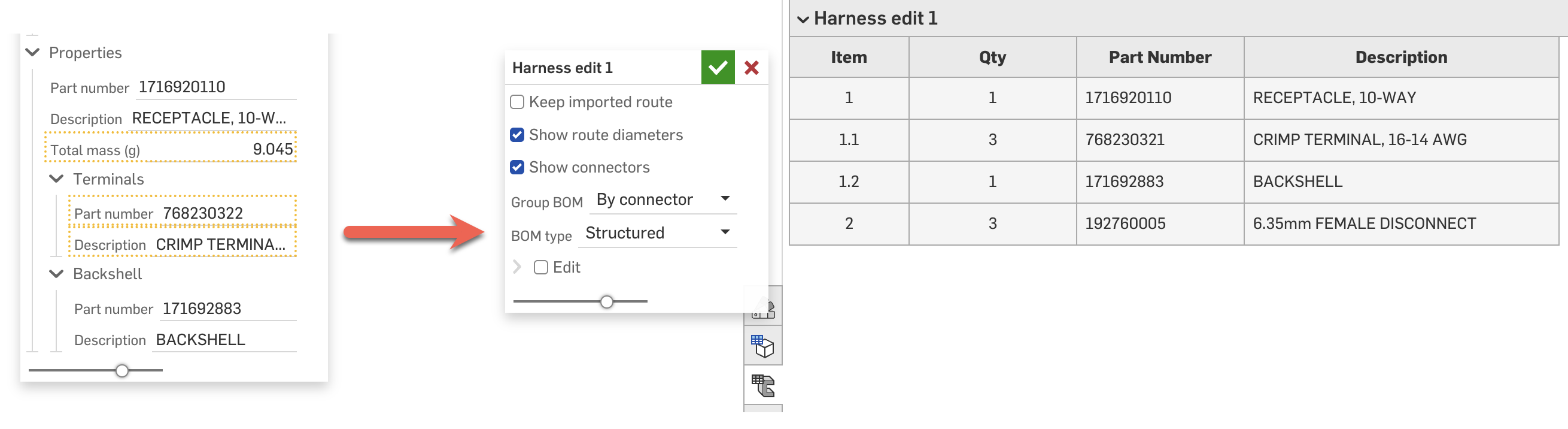 Senior Director, Technical Services, EMEA1
-
Nice updates @NeilCooke!
@EvanReese we always have the 3D-routed result (the first part studio) release managed and inserted in assemblies, because naturally these 3d routes are in the assembly anyway for in-context modelling. To ensure there's clarity, the 3D route is always removed from the flattening part studio.
In the drawing, the 3D route is inserted as the sheet reference, usually just as an ISO-view, and the flattened layout is 'not revision managed' and inserted in the drawing for the annotation purposes, along with its tables and cut list.1 -
Interesting, one challenge is that we often end up using the same harness in different assemblies so have to create multiple "shapes" of the 3D route which kind of prevents us from using rev-control on that…
We also use Arena PLM so it changes things a bit.We normally would create an assembly of the harness in its straight config and use that for the drawing so that we can also create generate the BOM in Arena.
I haven't actually used the flattening for any "real work" yet but now that is a "BOM" available I need to take a look to see how we might be able to integrate this in the Arena workflow…
0 -
I haven’t found issues with multiple 3D shapes of the harness at all, different assemblies, different in-contexts from those and configure those as exclude from properties.
It’s good to be a little strict on naming such that you don’t start mixing configs and in-contexts that don’t match.And there’s a trick: the guides query in an array parameter can’t be configured. But a query variable can!
And another trick with the connector locations; rather than placing them on an MC from the in-context, place it on an MC (not owned by anything) that you then transform to the in-context location prior to placing it with the connector tool. Means the “id” is static, it’s the MC. And the transform is easy to configure.Only thing missing is fixed harness length like the routing curve tool so it’s a little manual to get it close enough on length…
0





