Welcome to the Onshape forum! Ask questions and join in the discussions about everything Onshape.
First time visiting? Here are some places to start:- Looking for a certain topic? Check out the categories filter or use Search (upper right).
- Need support? Ask a question to our Community Support category.
- Please submit support tickets for bugs but you can request improvements in the Product Feedback category.
- Be respectful, on topic and if you see a problem, Flag it.
If you would like to contact our Community Manager personally, feel free to send a private message or an email.
Replicating Intermittent Motion of a Geneva Mechanism by Simple Drag (Solved in SOLIDWORKS)
 michael_wilson6152f9d6e623eb7112dd85f8
Member Posts: 2 ✭
michael_wilson6152f9d6e623eb7112dd85f8
Member Posts: 2 ✭
I recently had a need to duplicate the intermittent motion of a Geneva Mechanism in my CAD software (SOLIDWORKS) by way of dragging a part in real time, in other words, without having to use Collision Detection, Physical Dynamics, Motion Study/Analysis, Simulation, Animation etc.
A quick internet search led me here to a few posts I saw where folks were attempting to do the same thing in Onshape:
Can I simulate a Geneva drive? — Onshape
geneva cam assembly - intermittent relation — Onshape
Unfortunately, I was not able to find any solutions, so I came up with my own and decided to share it with the folks here in case this technique can be recreated in Onshape.
Note that this was done in SOLIDWORKS 2022:
Files Include:
Geneva 2022.SLDASM
Geneva 2022_Driver.SLDPRT
Geneva 2022_Path.SLDPRT
Geneva 2022_Wheel.SLDPRT
I have no idea if Onshape is capable of duplicating this, but hopefully it can or will be able to in the future. I am leaving a copy of the files here for those with access to SOLIDWORKS 2022 or higher.
Instructions:
- Open ‘Geneva 2022.SLDASM’ in SOLIDWORKS 2022 or higher.
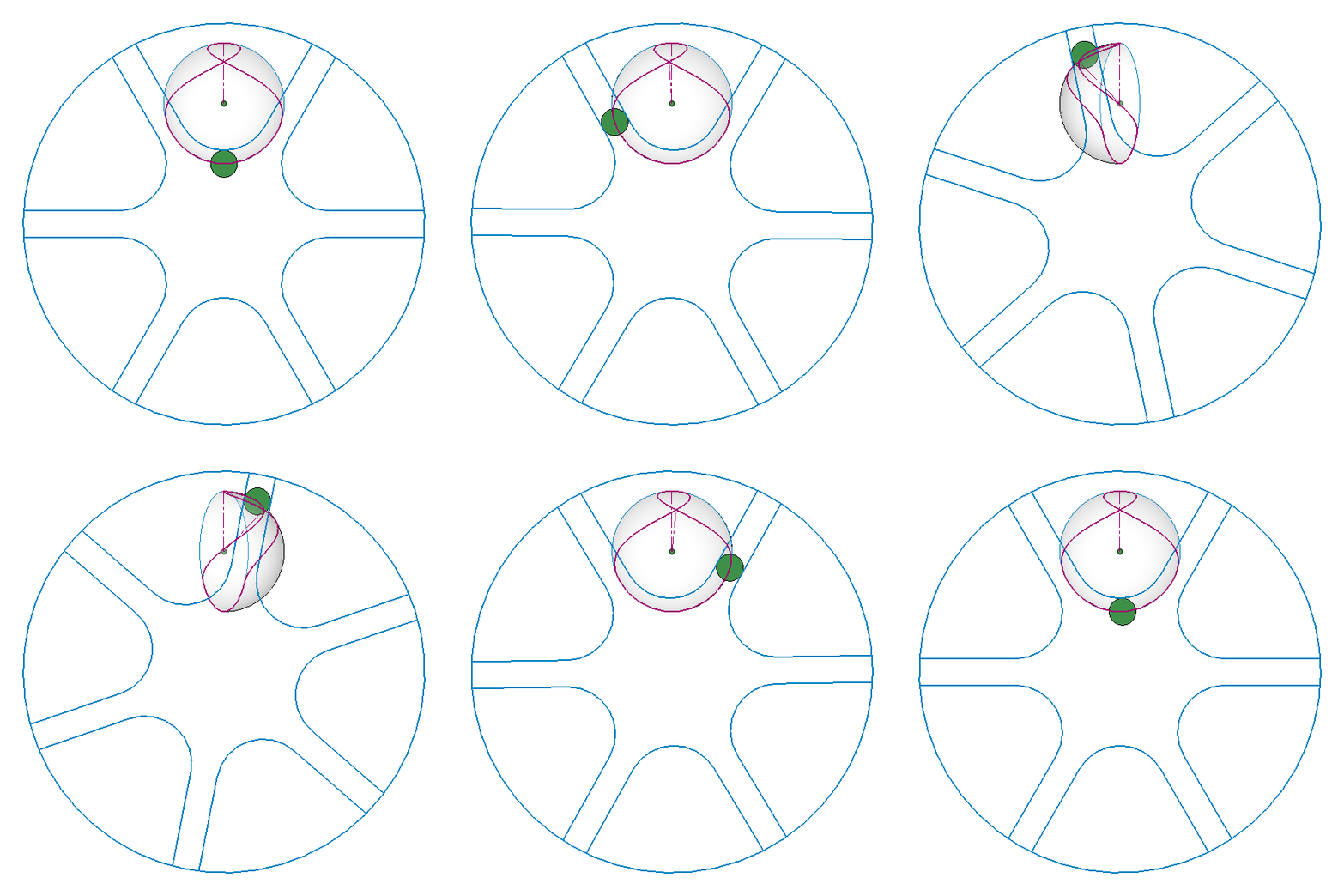
- Drag large green circle on ‘Geneva 2022_Driver.SLDPRT’ either clockwise or counterclockwise.
- Assembly animates in real time.
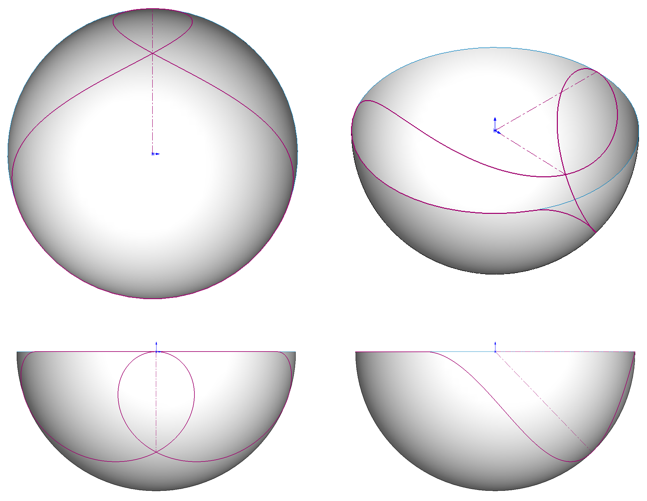
The technique makes use of a hemispherical shaped Spline in a 3D Sketch within ‘Geneva 2022_Path.SLDPRT’. The 3D Sketch forms a continuous loop allowing for an infinite number of rotations. The Driver part is mated to the Path part. The Path part is mated to ‘Geneva 2022_Wheel.SLDPRT’ via a Gear Mate with a 6:1 ratio. This technique has the potential to work in other mechanisms where intermittent motion is required.
Animated GIF:
Spline Path General Layout:
Comments
Great idea but there is no path mate in Onshape and there would be too many solutions for the tangent mate to work. You also don't need SW22 you can just import it into Onshape as is.
Clever approach! What if the driver was a point defined 0 to 100% length on the 3D spline (or some other spline or line)?