Welcome to the Onshape forum! Ask questions and join in the discussions about everything Onshape.
First time visiting? Here are some places to start:- Looking for a certain topic? Check out the categories filter or use Search (upper right).
- Need support? Ask a question to our Community Support category.
- Please submit support tickets for bugs but you can request improvements in the Product Feedback category.
- Be respectful, on topic and if you see a problem, Flag it.
If you would like to contact our Community Manager personally, feel free to send a private message or an email.
Fastened mate orientation error/bug/unexpected behaviour
 rune_thorsen229
Member Posts: 182 EDU
rune_thorsen229
Member Posts: 182 EDU
In assembly, when placing a carefully oriented fasten mate between two parts like these (notice the mate orientation)

I would expect this to happen

instead I get this

It depends on the starting position of the parts, but I consider it as a serious bug. You may argue that it is intended behaviour but it is rather illogical if it is a 'fasten mate' because it behaves like a revolute mate at the moment of solving.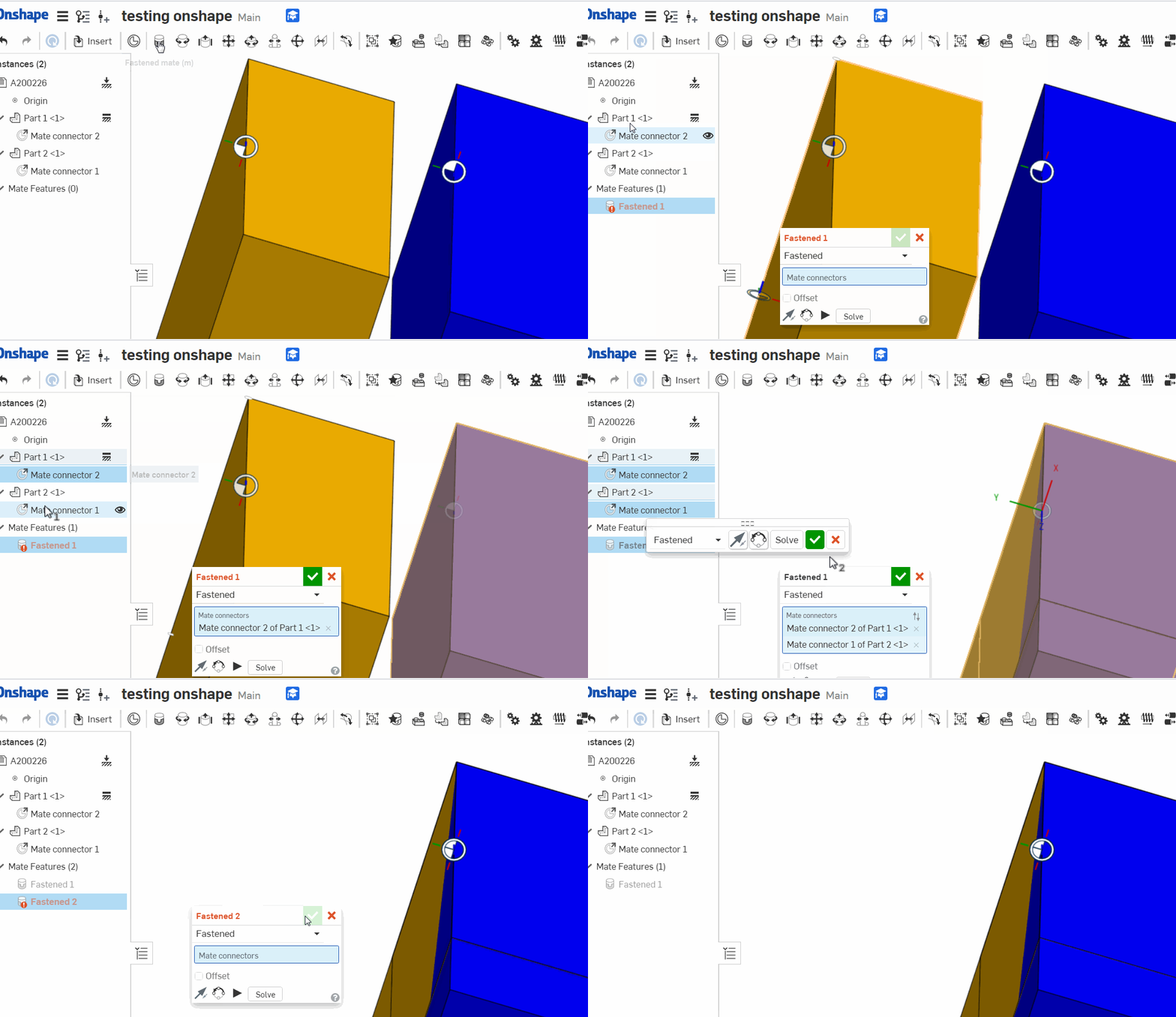
I would expect a fasten mate to solve to match the orientation, place and plane as initially and only subsequently when the user changes orientation it should turn
I would expect this to happen
instead I get this
It depends on the starting position of the parts, but I consider it as a serious bug. You may argue that it is intended behaviour but it is rather illogical if it is a 'fasten mate' because it behaves like a revolute mate at the moment of solving.
I would expect a fasten mate to solve to match the orientation, place and plane as initially and only subsequently when the user changes orientation it should turn
Tagged:
1
Comments
Furthermore I encountered this problem where mates seems to give an unexpected offset
I use a line in a plane to place the mate
Document :https://cad.onshape.com/documents/dd4e620547fb95eb0b416aee/w/811d2761aa092256e78facf8/e/b82448a6521d3b3e1aaf5f93
HWM-Water Ltd
--------------------
As for your original topic. In general, the reason this is not a bug is:
Because each mate connector has 8 possible orientations relative to the origin point of each mate connector.
I understand your logic, default should be origins of both mate connectors are aligned X-X Y-Y Z-Z.
But if that were the case, then you will end up editing your mate orientation 99% of the time, rather than just pre-position the part and snap a mate. Much quicker the way Onshape currently has it.
Basically ignore the mate connector xyz position, treat it like a point, then flip/rotate until it is in the correct position.
This is the same behavior as I'm used to seeing in SolidWorks (pre-position before mating lest you fold your assembly into the fourth dimension)
with the exception of mating two origins with a coincident. Those behave as you expect mate connectors to.
https://cad.onshape.com/documents/dd4e620547fb95eb0b416aee/w/811d2761aa092256e78facf8/e/b82448a6521d3b3e1aaf5f93
"I understand your logic, default should be origins of both mate connectors are aligned X-X Y-Y Z-Z."
Exactly. I spent some time trying to understand why things were not perfectly aligned. Then I realigned the mates on my parts so they should be perfect when assembled just to find that I have to spend time realigning it all again.
Most of all what I don't understand is why the solver engine doesn't do that mating as first guess.
Secondly its faster selecting the relevant mates from the Instance list.
Finally I think it's exposes a error prone result when you cannot trust mates to align xxyyzz. I saw a comment thread where somebody are aligning thin sheets having the same probelm.
What the heck…????
I encountered a similar problem. Why would Onshape set the fastened mate orientation of a part along the global part studio orientation instead of the relative surface orientation?
I select a object with 4 rectangular corners. And I fasten mate another object with 4 rectangular corners. Those to faces need to be oriented relative to each other an have nothing to do with the global XYZ orientation?
I can't hardly see a use case where a designer would want to place the grey part in the global xyz orientation.
This really needs to be fixed. What do you think?
Try it out yourself: https://cad.onshape.com/documents/2cb6506fca7b63acd19e2dd9/w/c7ca1eb0536d605657140990/e/37647dd9f84fe2209708eb8b
Actually I do like the default setting to global part studio orientation, since you tend to draw the part in true position. Then mating is easy in the assembly because the mate connector is already rotated correctly.
Since mate connectors can be used off faces, edges, end points, mid points, etc.
this gives you freedom to choose at the assembly level.
If you wanted to have a bunch of square blocks always parallel to the floor, like you are seeing in your image above. Then do a mate connector on the center face and it will stay oriented.
if you want to mate it rotated with your object, then use the edge instead. like this:
Thank you John, the line selection is a decent workaround. I stumbled over this issue with just a small angle and did not recognize first, because the deviation was not visible first hand. However to me it makes no sense to have global orientation "as default" on a mate connector when I only select. And it makes no sense in special to use the orientation of a part studio which is maybe not even in relation with the assembly. The relation only exists between two individual rectangular surfaces with it's own orientation. It has nothing to do with any geometry outside the selection. Funny enough when you rotate the part after fastening the part rotates with the rotating part indipendant of a global orientation. So in my opinion default setting should be the surface to surface relation. The optional setting can be oriented by selection of an edge of a body. What do you think?
Honestly I think it's 50/50 depending on the type of work each person does normally.
I think you may be stuck at this point, since there are millions of legacy assemblies that are built with this behavior.
To change it now may break everyone's existing model that is relying on it.
I know this was just an example using simple blocks, but I think it's asking for trouble using implicit MC's as fasten mates in an asm. If you add a round or draft to the part, it will mess up the alignment in the asm. The only time I use implicit MC's is when fastening hardware to a hole.
If instead an explicit MC is made in the part studio, then it won't change if rounds or drafts are added, and it will be aligned the way you want it.
That is true. An explicit MC is much more stable indeed. However placing an explicit mate connector kind of kills the advantages of the onshape mating system. I guess it is even slower than the traditional 3DOF mating method.
Yeah you are probably right. In most cases people work in orthogonal mode. So the issue does not appear anyways.
And the circular arrays with angles will usually have round parts inserted (e.g. flange and bolts).
And for the other cases your workaround with selecting the edge instead of the face is really helpful.
I'm just super confused that with the edge selection the orientation from the edge is used, but with face selection the global orientation of the part studio is used instead of the face orientation. Seems not so consistent to me.
To me, it makes sense: A flat face, essentially being nothing but a plane, doesn't have any orientation a s such, other than the orientation defined by its boundaries. From this point of view, it makes sense to use the edge orientation whenever an edge is involved in the selection, and the studio orientation whenever a planar entity is selected. I've used this for quite some time now and never felt uncomfortable with it. I case it doesn't match intent, there's alway an option to realign the MC with whatever is needed.
That said, I believe the realigning UI could still need some improvement itself.
Right, but on the flip side. When modeling things at compound angles and such, it's nice when the mate connector is already set to the world coordinate system of the part studio. Rather than having to manually rotate the mate connector.
And for normal square and straight stuff that's also usually wanted to be on world coordinates.
if it went relative to the face of the flange my arrow is pointing, it would have twisted stuff.
Makes this kind of stuff work pretty good, even with replicate.