Welcome to the Onshape forum! Ask questions and join in the discussions about everything Onshape.
First time visiting? Here are some places to start:- Looking for a certain topic? Check out the categories filter or use Search (upper right).
- Need support? Ask a question to our Community Support category.
- Please submit support tickets for bugs but you can request improvements in the Product Feedback category.
- Be respectful, on topic and if you see a problem, Flag it.
If you would like to contact our Community Manager personally, feel free to send a private message or an email.
Improvements to Onshape - February 13th, 2018

NeilCooke
Moderator, Onshape Employees Posts: 6,079 
The update engine keeps rolling along! In this latest update there's a new graduate from the ever-growing pool of community custom features, some cool Drawing updates including an associative callout feature, more Standard Content and plenty of usability delighters that you've all been asking for. Don't forget to vote for your favorite improvement requests in the category on the right to help us prioritize development.
You can now import SOLIDWORKS 2018 part files (.SLDPRT) and assembly files (.SLDASM). To import an assembly, you can either use SOLIDWORKS' built-in Pack & Go feature to create a ZIP file containing all the parts and assemblies, or create a ZIP file manually and rename it to be the same as the top-level assembly (for example, if the top-level assembly is called water_pump.SLDASM then your ZIP file should be called water_pump.zip). Import the ZIP file and Onshape will create the correct assembly structure.
Please take a moment to try out these new features and improvements and leave your comments below. For a detailed list of all the changes in this update, please see the changelog.
Remember: The updates listed here are now live for all users when creating new Documents and over the next few days these features will also be available in Documents created before the date of this update.
NON-UNIFORM SCALING
The Transform feature can now be used to apply non-uniform scaling. Choosing a mate connector as the reference entity will scale about the mate connector center and use the mate connector coordinate system.ASSOCIATIVE BALLOONS / CALLOUTS
Balloons added to an assembly drawing are now associative to the active BOM table or can be used as callouts to display part properties. If the part or table properties change, the balloon or callout will update automatically.DOCUMENT THUMBNAIL
You can now specify which element is used as the thumbnail for your Document on the Documents page.CONFIGURED PART THUMBNAILS
Now when inserting parts from a configured Part Studio into an assembly or a drawing, the correct thumbnail for the selected configuration is displayed.SPLIT PART IMPROVEMENTS
You can now use a sketch region or a face from a solid or surface body to split a Part. A new option, "Trim to face boundaries", determines whether these new selection types are extended to the boundaries of the Part or not. This enables you to split individual areas of your design without affecting the rest of the Part.SUBASSEMBLIES WITH FIXED PART INSTANCES
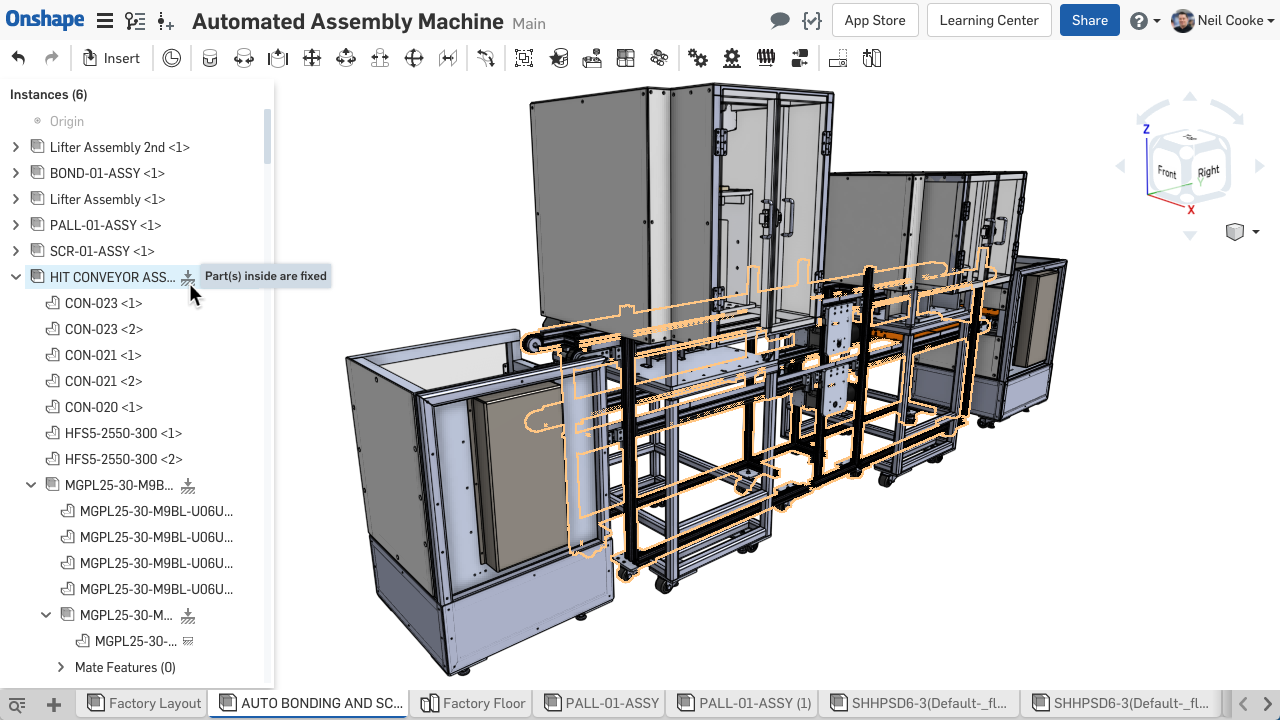
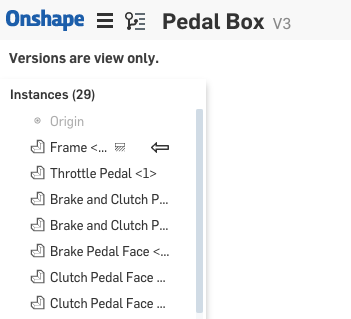
Previously it was difficult to find fixed part instances if they were buried deep within an assembly structure. Now each subassembly, starting from the top level assembly, will display an icon next to its name to indicate that it contains a part that has been fixed.RESIZE CONFIGURATION TABLE COLUMNS
For those extra long table cells with expressions and arrays or those extra short cells with just checkboxes, you can now edit each column width in a configuration input table to display the information exactly how you want it.RESIZING DRAWING NOTES
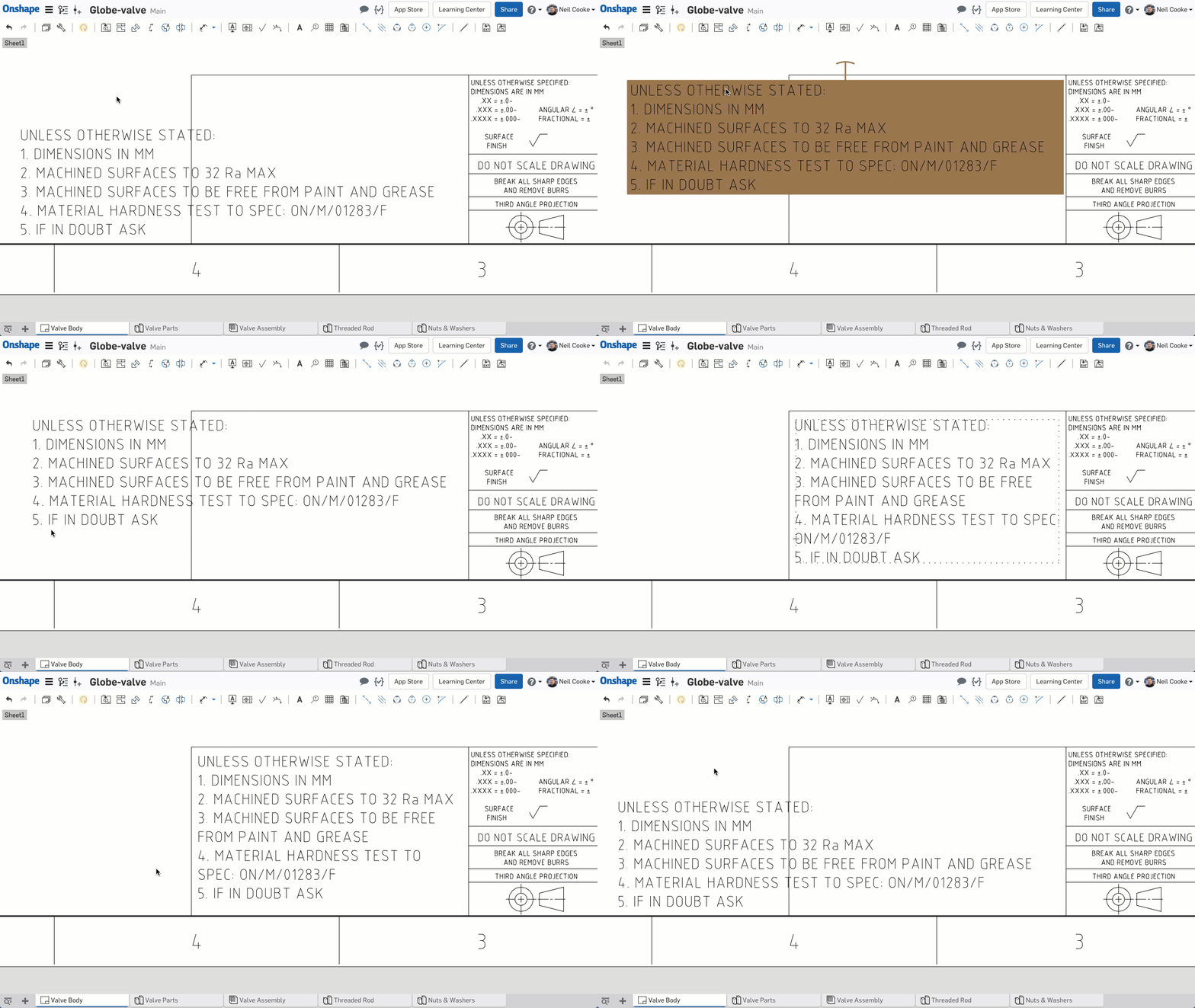
Now when you resize a drawing note, a bounding box appears to make it easier to visualize the final size of the note.MOVE TO SHEET & VIEW HIGHLIGHTING ACROSS SHEETS
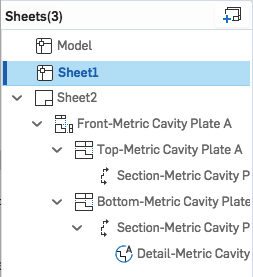
A new "Move to sheet" option has been added to the right mouse button menu to quickly move views from one sheet to another. Also, selecting section views, detail views and auxiliary views that have been moved to another sheet now highlight their respective section lines, detail circles and auxiliary projection lines on the current sheet.DRAWING SHEET ICONS
Drawing sheets that were created by importing DWG or DXF files now have an icon in the Sheets flyout to differentiate them from native Onshape drawing sheets.VIEW PROPERTIES WITH CONFLICTING VALUES
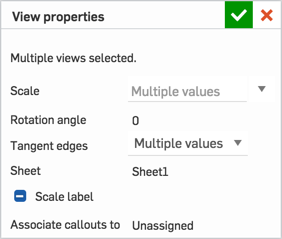
When viewing the properties of multiple drawing views with conflicting values, the fields that are different display "Multiple values" for numeric and choice fields and "-" for checkboxes. You can override all values at the same time by entering a value into numeric fields, selecting an option from a pull-down menu or clicking a checkbox.INSERTING A VERSION
Now when inserting a Derived feature or inserting a Part, image or custom feature, the Insert dialog has two new buttons - "Version graph" and "Create version". These buttons will allow you to easily select the version you want to use or create a new version in the current workspace and use that. Inserting a version rather than the current workspace prevents automatic updates when the source element updates, giving you control over when the inserted item is updated.VIEWING A VERSION FROM A LINK
If a link to a version of a Document is shared with another user, the option to "Return to Main" is no longer visible. This change has been made to remove any confusion. The user will still be able to navigate to Main if required through the Versions and History flyout.ADDITIONAL STANDARD CONTENT
The built-in library of standard fasteners has been expanded to include:- Machine screws:
ANSI Hex Head Machine Screw
ANSI Hex Washer Head Machine Screw
ANSI Pan Slot Head Machine Screw
ANSI Pan Cross Head Machine Screw
ANSI Oval Countersunk Head Machine Screw
ANSI Flat Countersunk Head (82) Machine screw
ANSI Flat Countersunk Head (100) Machine screw
ANSI Binding Head Machine Screw
ANSI Round Head Machine Screw
ANSI Fillister Head machine Screw
ANSI Truss Head Machine Screw
- Self tapping screws:
ANSI Pan Head Tapping Screw
ANSI Fillister Head Tapping Screw
ANSI Hex Washer Head Tapping Screw
ANSI Hex Head Tapping Screw
ANSI Flat Countersunk Trim Head Tapping Screw
ANSI Oval Countersunk Trim Head Tapping Screw
ANSI Flat Countersunk Head Tapping screw
ANSI Undercut Flat Countersunk Head Tapping Screw
ANSI Oval Countersunk Head Tapping Screw
ANSI Undercut Oval Countersunk Head Tapping Screw
- Round head bolts:
ANSI Round Head Short Square Neck Bolt
ANSI Round Head Fin Neck Bolt
ANSI Round Head Ribbed Neck Bolt
ANSI Round Head Step Bolt
- Others:
ANSI Countersunk Elevator Bolt
ANSI Askew Head Bolt
ANSI T-Head bolt
IMPORTING SOLIDWORKS 2018 FILES
You can now import SOLIDWORKS 2018 part files (.SLDPRT) and assembly files (.SLDASM). To import an assembly, you can either use SOLIDWORKS' built-in Pack & Go feature to create a ZIP file containing all the parts and assemblies, or create a ZIP file manually and rename it to be the same as the top-level assembly (for example, if the top-level assembly is called water_pump.SLDASM then your ZIP file should be called water_pump.zip). Import the ZIP file and Onshape will create the correct assembly structure.IMPORTING NX 12 FILES
You can now import part and assembly files (.prt) from NX 12 by Siemens PLM Software. To import an assembly with external references, create a ZIP file containing all the parts and assemblies and rename it to be the same as the top-level assembly. Import the ZIP file and Onshape will create the correct assembly structure.NEW LEARNING CENTER COURSE
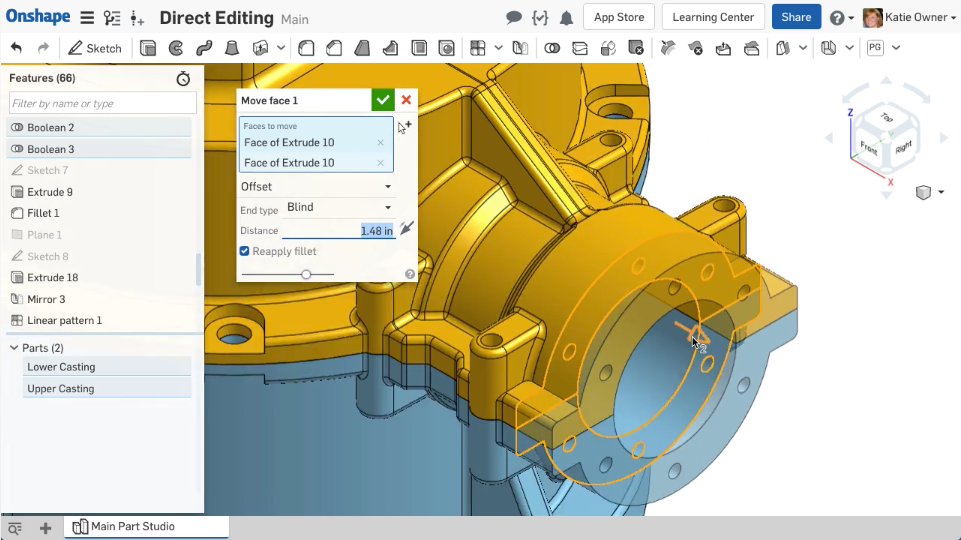
An additional advanced course for Direct Editing has now been added to the Onshape Learning Center for Professional users.Please take a moment to try out these new features and improvements and leave your comments below. For a detailed list of all the changes in this update, please see the changelog.
Remember: The updates listed here are now live for all users when creating new Documents and over the next few days these features will also be available in Documents created before the date of this update.
Senior Director, Technical Services, EMEA
7
Comments
-
Legit.
Thank you Onshape team!2 -
Yee Ha! Non-uniform Scale and Split Part improvement. Thank you OS developers!www.accuratepattern.com3
-
"SUBASSEMBLIES WITH FIXED PART INSTANCES"
That's an excellent addition, but this would still be nice to have.
https://forum.onshape.com/discussion/7375/show-only-fixed-parts#latest
0 -
Amazing features!
Balloon system seems very nice, with built-in BOM that should be a killer combination.
Now when inserting a Derived feature or inserting a Part, image or custom feature, the Insert dialog has two new buttons..
With shaking hands and big wishes I immediately wen't to test linking the CURRENT version of LINKED DOC but no luck..
My day dream was greyed out..

//rami1 -
@3dcad - Rami, automatic updates still occur in the SAME document (a change to the workspace updates everywhere else in THIS document).
Across documents, we intentionally use version links (this enhancement simplifies that workflow).
The most common use case (and the reason we do it this way), is that at the ideation stage, a document is likely to contain multiple Part Studios and Assemblies - each updating continuously. As a design starts to mature, it is likely that parts will need to be manufactured, or at least prevented from changing in an unchecked fashion. At that point, the best practice is to move that element (Part Studio) to a new Document. This will automatically link the part back into the main Document AND automatically reference the latest version. This achieves that goal.
These concepts and practices are embodied in this Tech Briefing that can be found in the learning center. It's an easy read and written by one of our top guys!
https://learn.onshape.com/learn/article/product-structure-organization-tips
Philip Thomas - Onshape0 -
Fantastic. Special thanks for
1. Fixed part indicator
2. Associated Balloons
3. Thumbnail
4. Non uniform scaling (just ran into this problem 2 days ago!)
1 -
@philip_thomas
I understand why it is good to link to a version, what I don't understand is that why can't I choose whether I wan't to risk my assembly breaking due to unwanted change in linked doc or not. I wan't to be the boss, not software.
The problem is all the documents that contain ever growing library of special standard parts modeled in house. I don't wan't to separate each to it's own doc for easier locating but current system forces me to create new version on each update or addition to these libraries.
Thanks for the link, it's nice that we have possibility to learn from the master //rami0
 -
@3dCad - Rami - we live to make you happy. And I do hear what you're saying. There are some things i think we might be able to show you to help you and of course, @abefeldman and i are always happy to learn from your feedback
 Philip Thomas - Onshape0
 -
The future of Onshape is opening and grow up every 3 weeks... I loved Onshape2
-
You all have been busy!
Excellent work as always. I'm so happy for associated balloons, looks like you hit another home run with all the control we have over balloons now!3 -
Can't make that BOM/balloon to work. Should something be done on openbom side? Actually can't even add openbom right now :-( Just says "access to application has been denied for this onshape account".br
Markku
www.sloworks.fi0 -
-
@NeilCooke @Markku_L
The problem was reported to Onshape ~2 hours ago. It is app store Onshape related in my view. We have few accounts experiencing access to OpenBOM application and account experiencing access problem to app store in general.
@AndrewKimpton ^^
0 -
@andrew_kimpton
thanks for quick reply. We're checking it. I hope we resolve soon.
If anybody is experiencing problems to access OpenBOM app, please send an email asap to support @ openbom.com
1 -
Many thanks for again a lot of usefull update's
And a lot of ANSI new standard part's
Maybe next time some ISO part's ??
Like this oneSocket Button Flange Screw to ISO 7380F with the Nut's with flange as well.
These are very often used in europe
Thank's 1
1 -
Awesome, Great to see another update and looking forward using the new associative balloons feature, it looks very well thought out. It's also good to see some improvements coming into assemblies these are much needed to help in the management of large flexible assemblies.
And special thanks for addressing the default thumbnail bugbear, I have already started going through and selecting the desired tabs for my documents to display. Works beautifully. Thanks
5 -
Very nice update. My favorite is automatic balloons (callouts) placement.
It can be smoothly integrated and used together with OpenBOM functions.
The following article and video can give you few very good tips how to use automatic callouts and BOM created using OpenBOM
https://medium.com/@openbom/openbom-and-onshape-new-automatic-callouts-balloons-dac7096282d2
0 -
Openbom works now, but made another ticket about the balloon, still can't link anything into it. Property or bom, balloons just says "---". I tried with 2 different accounts, several models, several boms...just no.andrew_kimpton said:@Markku_L OpenBoM and the team at Onshape are taking a look at this problem this morning and hope to resolve it very soon.
This should be automatic built-in feature!br
Markku
www.sloworks.fi1 -
Oh, balloon works only when attached to edge :-(Markku_L said:
Openbom works now, but made another ticket about the balloon, still can't link anything into it. Property or bom, balloons just says "---". I tried with 2 different accounts, several models, several boms...just no.andrew_kimpton said:@Markku_L OpenBoM and the team at Onshape are taking a look at this problem this morning and hope to resolve it very soon.
This should be automatic built-in feature!br
Markku
www.sloworks.fi2 -
good to know thanks for the heads upMarkku_L said:
Oh, balloon works only when attached to edge :-(Markku_L said:
Openbom works now, but made another ticket about the balloon, still can't link anything into it. Property or bom, balloons just says "---". I tried with 2 different accounts, several models, several boms...just no.andrew_kimpton said:@Markku_L OpenBoM and the team at Onshape are taking a look at this problem this morning and hope to resolve it very soon.
This should be automatic built-in feature!1 -
1
-
Finally the ability to set a thumbnail! I'm constantly trying to locate documents based on the thumbnail, but it was ever changing, no longer!3
-
-
Great update!
Future request is the ability to import Solid Edge .psm files.
0 -
I wonder if a compromise would be to allow Current (live) Workspaces to be linked into development branch but never onto the Main branch. That way users could build designs (in a semi-controlled way) across documents without the continued dropping of versions but still have the safety of ensuring Main Branch always has the unbreakable linked versions, these may have to be manually created before merging across to the Main Branch at the completion of the design stage, also maybe we could see a branch warning to let users know it has live workspaces from others doc which could be broken.3dcad said:
Now when inserting a Derived feature or inserting a Part, image or custom feature, the Insert dialog has two new buttons..
With shaking hands and big wishes I immediately wen't to test linking the CURRENT version of LINKED DOC but no luck..
My day dream was greyed out..1 -
When moving a view to a different drawing sheet, can Onshape automatically add the sheet number as to where it was moved to. Like wise, when looking at the section/detail, reference the sheet number of the parent section/detail? It makes finding these sections/details easier vs. hunting around for the views on multiple sheet drawings.
1 -
@bryan_lagrange
You can rename *.psm file to *.par then Onshape can import it. Often-times you'll be able to use Sheet metal model Thicken to make Onshape sheet metal model using imported geometry. We'll work to improve this experience, but for now there is a work around.
2 -
Just used the new split function. Big thumbs up from me to whomever was responsible for that upgrade.
Also noticed a new "create selection" icon within the delete face function. This is a great visual nudge towards using the selection tools.
Thanks folks
Cheers,
Owen S.
Business Systems and Configuration Controller
HWM-Water Ltd1 -
Thanks for the show fix indicator .
 2
2