Welcome to the Onshape forum! Ask questions and join in the discussions about everything Onshape.
First time visiting? Here are some places to start:- Looking for a certain topic? Check out the categories filter or use Search (upper right).
- Need support? Ask a question to our Community Support category.
- Please submit support tickets for bugs but you can request improvements in the Product Feedback category.
- Be respectful, on topic and if you see a problem, Flag it.
If you would like to contact our Community Manager personally, feel free to send a private message or an email.
Improvements to Onshape - May 3rd, 2019

cody_armstrong
Moderator, Onshape Employees, Developers, csevp Posts: 228 
It has been 3 weeks and we are ready to start May with an exciting new update! This update includes a number of highly-requested drawing improvements, performance improvements, and more. Let's take a look.

CAD IMPROVEMENTS
SPLIT BOM
You can now split the Bill of Materials in an Onshape Drawing.JOG POINTS IN ORDINATE DIMENSIONS
When manipulating ordinate dimensions, you will now see additional controls that allow you to re-position jogs.DRAWING VIEW RENDER MODE
You can now set the render mode used in drawing views in Onshape. By default, the render mode will be set to "Best performance" on all new drawings, but can be set to "Best quality" if you want to favor quality over performance. Drawing views created prior to this update will be set to "High quality" but can be changed. This improvement combined with some other performance improvements has led to a significant decrease in drawing load times as well as the time it takes to generate drawing views.LARGE ASSEMBLY PERFORMANCE
The performance of large assemblies has been improved with this update. The most noticeable change is the decrease in time it takes to open a large assembly that is referencing many Part Studio tabs. In the past, this involved pulling in each Part Studio in a serial process, but with this update, that process is now done in parallel.DETAIL PANE IMPROVEMENTS
Improvements have been made to the Detail Pane to make it easier to use. Now when you select a Document from the Documents page you can choose to view the "Details" or the "Share Details." PROFESSIONAL IMPROVEMENTS
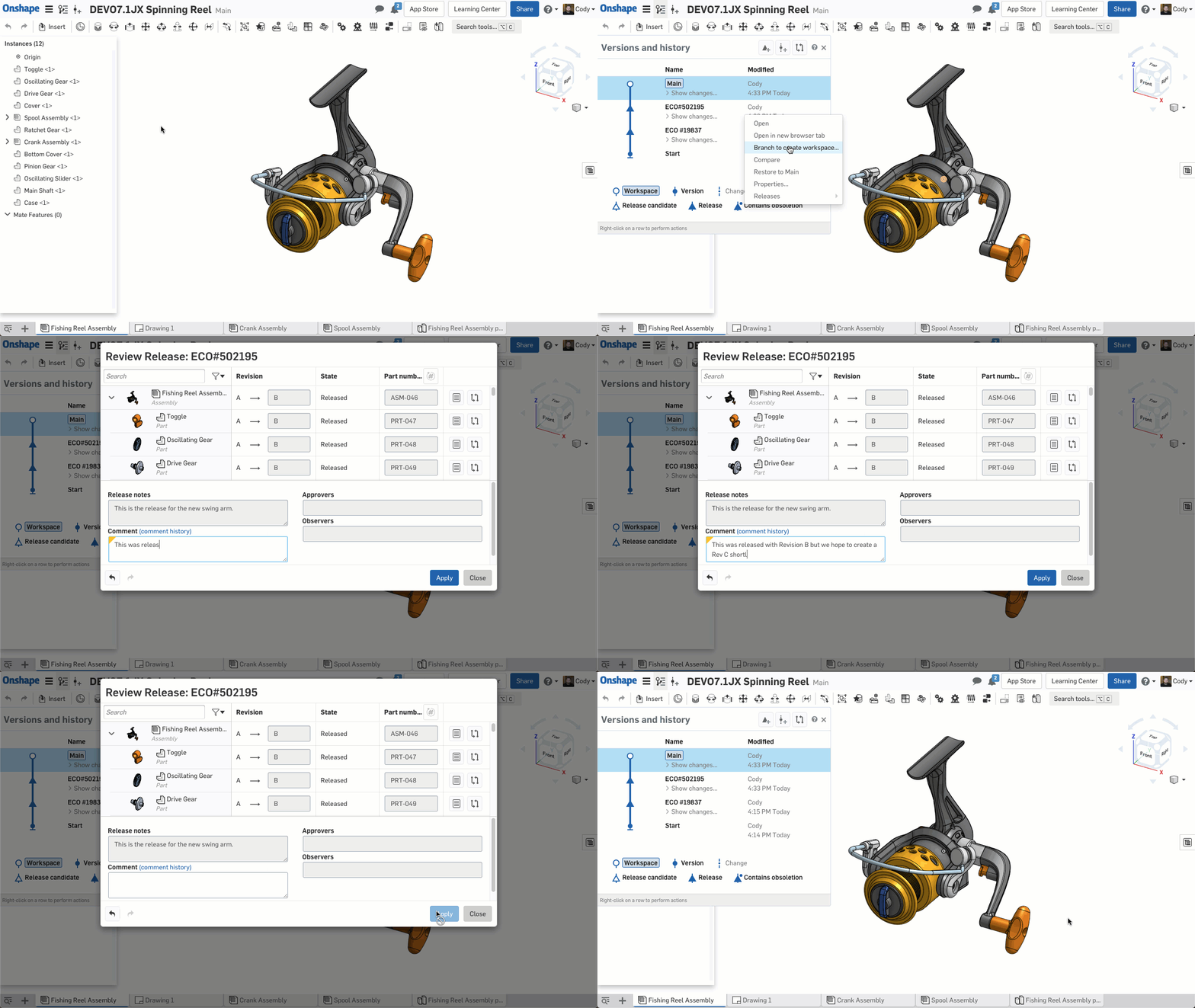
ADD COMMENTS TO PAST RELEASES/OBSOLETIONS
You can now add comments to past releases or obsoletions.ENTERPRISE IMPROVEMENTS
USING PROJECT ROLES AS APPROVERS OR OBSERVERS
When creating a release candidate, you can now use Project Roles for the Approver or Observer field.
Please take a moment to try out these new features and improvements and leave your comments below. For a detailed list of all the changes in this update, please see the changelog.
Remember: The updates listed here are now live for all users when creating new Documents and over the next few days these features will also be available in Documents created before the date of this update.
6
Comments
-
Good job once again!
I appreciate especially when you improve performance for large assemblies and drawings!
Split BOM is also a must.10 -
Nice job on the assembly performance!
 4
4 -
I don't know where to begin, very nice
Unfortunately, hidden lines still bring a sheet to a screeching halt
Keep cranking up that performance
6 -
Excited for this assembly performance upgrade!2
-
HOLY Crap!
You can split BOM to multi-sheet!
(guess I should of watched the video...)2 -
Split BOM and added performance 👌//rami2
-
Great update!www.vierhoutengineering.nlMechanical Structural Engineering1
-
Split BOM on drawings was a much-needed improvement. Also, the large assembly I am working on today looks much faster than it did yesterday, any improvement to speed is much appreciated. Thanks, heaps for these continued improvements keep up the great work, I am already looking forward to see what comes in after another 3 weeks.1
-
The performance boost with big assemblies is great!
Onshape is amazing and gets better every 3 weeks!
And I don't have to install updates or upgrade my hardware 2 -
On the new share info panel, I was expecting to be able to edit from here but can not seem to. I can still RBM on the list for share in the drop down menu but was expecting clicking the new icon would enable me to share or change settings, am I missing something?0
-
Split BOM. 1
-
Nice improvements!!!
As @EricGauthier said, I love the performance and drawings improvements.
Ummm... Onshape 1.96!!!
Are there plans for a Toga party online when Onshape reach v1.100?
Un saludo,
Eduardo Magdalena C2i Change 2 improve ☑ ¿Por qué no organizamos una reunión online?
Partner de PTC - Onshape Averigua a quién conocemos en común2 -
Large assemblies- 2 thumbs up!1
-
large assembly improve performance are awesome! Thanks for update..Thanks,
Effendi H.1 -
I really like the performance improvements1
-
Great with better large assembly performance. I still need 3d-sketching capabilities though. There are a bunch of things I simple cannot model properly without it.1
-
Drawing improvements are always great, drawings are still the main way we communicate with manufacturing so still need to produce drawings. Split BOM, Jog points in ordinate dimensions and the drawing view render mode are excellent. Would love to be able to sketch in the drawing environment so I can give more information.4
-
weight in BOM?2
-
Excellent work Onshape team! Thank you.
 3
3 -
Thanks, @MBartlett21 for the IR, this is what I'd expected from the new share button, not just a display panel https://forum.onshape.com/discussion/11671/edit-shares-from-share-panel#latestbrucebartlett said:On the new share info panel, I was expecting to be able to edit from here but can not seem to. I can still RBM on the list for share in the drop down menu but was expecting clicking the new icon would enable me to share or change settings, am I missing something?
1 -
I know that this stuff is good and all, but I really need things like, being able to add an image to the surface of a part, or being able to change the color of individual surfaces (both in Part Studios and Assemblies), add surface textures, and have exploded views for assemblies that can easily translate to drawings, and I need a way to manage the grossly oversized assembly tree. And right up there at the top of needs is getting the Mate Features entirely out of the Assembly Tree. These would be best handled in their own drop-down, associated specifically with the part. In very large assemblies, when mating parts and assemblies to one another, the system drops all the way down to the bottom of the Tree, forcing you often to scroll up to find predetermined mate connectors within the individual parts or assemblies. Way Too Much Scrolling, and Way Too Long of a Tree.
6 -
I agree with mates referenced with the part. But they should also be in bulk on the bottom (like SW)
sometimes it is easier to window select from the bulk list rather than exclusive have them stored in the part instance.
And yes yes yes to everything you said
There are some IRs floating around for a few of those.
If you make IR, they will come.0 -
@john_mcclary
@don_williams909
I would like the assembly tree to be split into two parts, each scrolling separately, like the parts list and feature list in the part studio.
Do you agree?3 -
I could get down with that0
-
Any hope for the next update before the holiday?
 Looking to play with new features during the long weekend
0 -
Not ready yet @john_mcclary so it will be after the holiday.4
-
Thanks at least I won't have to keep checking Better know when it won't be, than know nothing at all 4











![[Deleted User]](https://w8.vanillicon.com/89b191becbe1bfbd78efe4619fd4f554_100.png)