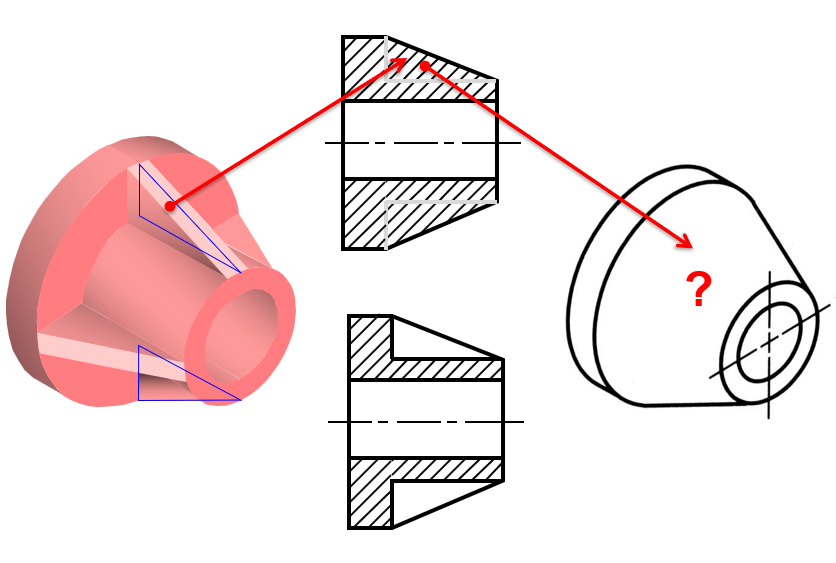
Welcome to the Onshape forum! Ask questions and join in the discussions about everything Onshape.
First time visiting? Here are some places to start:- Looking for a certain topic? Check out the categories filter or use Search (upper right).
- Need support? Ask a question to our Community Support category.
- Please submit support tickets for bugs but you can request improvements in the Product Feedback category.
- Be respectful, on topic and if you see a problem, Flag it.
If you would like to contact our Community Manager personally, feel free to send a private message or an email.
Cross hatching a rib

Answers
-
@vinay_maharaj, please elaborate. What are the sectioning rules that you refer to, relating to whether or not ribs should be cross-hatched in a section view? A screenshot might be helpful as well.0
-
No this is not possible - section rules in standards were primarily included to make a draughtperson’s life easier I imagine.Senior Director, Technical Services, EMEA2
-
I've seen older drafting books show this and seen some drawings like this, but I don't know that it's in drafting standards per se. I do think it actually makes drawings more confusing when you have to know when something appears as not cut - when in reality it is cut by the section. Are there practical reasons to not show hatching on rib areas, but show hatching everywhere else - even when view generation is doing the work for you? I suspect the definition of a "rib" can also become very murky at some point.1
-
@pete_yodis,
Also in 'old' drafting books but in my opinion still valid: solid shafts should not be cross hatched. This makes a section view more 'understandable and readable'. Is this feature possible in Onshape?0 -
@Henk_de_Vlaam Not crosshatched is not necessarily the same thing as not cut. Not cut is much more common and yes we have plans for excluding from a section, not cutting those parts that are excluded.
The request for not hatching a rib, is much more murky and does apply to a piece of geometry within a single part, and in fact it is really cut - but not hatched. It's cut in examples and if you look closely you see the profile of the rib, but the hatching is not present for it. @NeilCooke alluded to perhaps on the manual drafting board it did save some time making hatching by hand (and yes, I'm old enough to remember those days). I suspect it might also be to convey that a part was not uniformly thick in the rib area across the entire part - when it took time to create yet another section view to illustrate that. Today though, it's pretty easy to make another section view in a different orientation to show the cross section of the rib and surrounding areas.0 -
For thin features, such as ribs, flanges, etc., the standard/traditional convention is to draw an outline without section lines to clarify that it is a different thickness (or, for some cases, to use different hatching rather than no hatching) while still sectioning the geometry. This is governed by ASME Y14.3 4.2.1 [EDIT: looks like the numbering changes between versions; it may also be filed under 10.3.1].
However, it is also allowable to use a "true geometry" representation without different hatching (what currently happens in Onshape). I believe SolidWorks allows you to choose whether you want to use a "conventional" or "true geometry" representation when sectioning thin features.
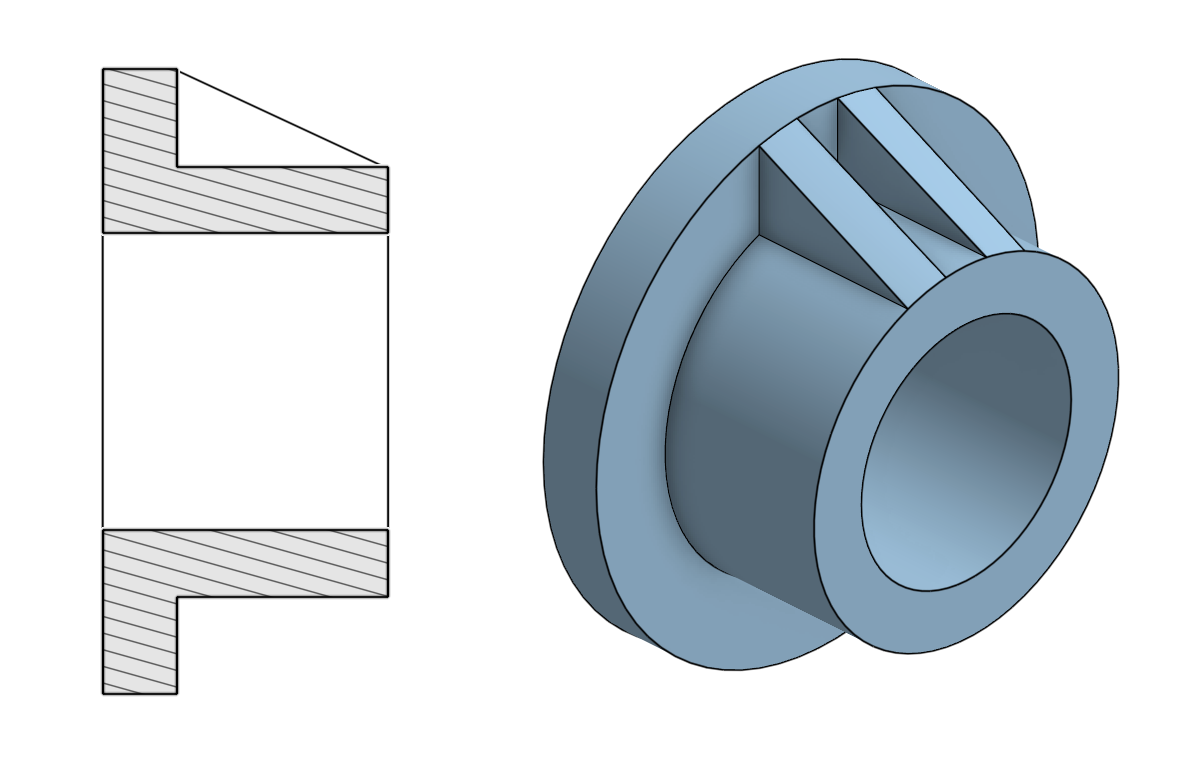
Here is an example where the thin features are sectioned without hatching:
Here is one where the section has different hatching:
Ultimately, I don't think it makes it too much more difficult to understand the drawing if we can't apply different/no hatching to thin features, but I also know some organizations are very particular in the conventions they would like drawings to follow.Get in touch: contact@alnis.dev | My personal site: https://alnis.dev
@alnis is my personal account. @alnis_ptc is my official PTC account.0 -
@pete_yodis Nice to read that there are plans to exclude parts from cutting.PeteYodis said:[...] Not cut is much more common and yes we have plans for excluding from a section, not cutting those parts that are excluded.
The request for not hatching a rib, is much more murky and does apply to a piece of geometry within a single part, and in fact it is really cut - but not hatched. It's cut in examples and if you look closely you see the profile of the rib, but the hatching is not present for it. @NeilCooke alluded to perhaps on the manual drafting board it did save some time making hatching by hand (and yes, I'm old enough to remember those days). I suspect it might also be to convey that a part was not uniformly thick in the rib area across the entire part - when it took time to create yet another section view to illustrate that. Today though, it's pretty easy to make another section view in a different orientation to show the cross section of the rib and surrounding areas.
And for the rest: The answers from @NeilCooke and you were more or less recognizable to me. In recent years, I have seen it happen in the CAD world that 'a rule' was somewhat dismissed because it was difficult or impossible to implement it in the software at that time. At best a workaround was then suggested. True? 1
1 -
@Henk_de_Vlaam Well, we do lots of difficult things - so it's not as much about that. It's about what things we should or should not be doing. Sometimes standards do carry over older behaviors and sometimes those are good, and sometimes they are just tradition. Users and companies sometimes pay attention to standards and sometimes do not. And those things change a bit over time. If we are looking to spend our resources wisely it's good for us to have a pulse on how common certain things are. In my experience the non hatching of ribs was always a bit esoteric and unclear as to why it's helpful - and from my experience in industry not really followed very much and when it is it's more for tradition sake and not necessarily helpful reasons to interpreters of the drawing . Not many folks in design in manufacturing would reference ASME Y 14.3. Most will reference ASME Y14.5 which covers dimensions and tolerancing. At Onshape we certainly want to help our customers create the designs they want and to document them, but it's prudent of us to ask these sorts of questions so that we use our resources most wisely.
1 -
Does anyone know of a 3D MCAD system which does cross sections without hatching the ribs? I've only ever seen this approach on manually drafted (by hand or dumb 2D CAD) drawings.
It seems like the reality is that it would be hard to have the system be smart enough to reproduce the hatching the way it's done in the first example @alnis_smidchens posted. The way the ribs join the revolved boss with fillets it would be strange to generate the fake edges where the rib is. If the CAD system has the history of the part, and certain features are marked as "ribs" it could take the section without the ribs and then draw the ribs without hatching. When a system has to deal with imported dumb geometry, this wouldn't be so easy.
Also, I've worked on so many injection molded parts where you could have philosophical arguments about whether a particular feature is a wall or a rib based on topology and wall thickness.Simon Gatrall | Product Development, Engineering, Design, Onshape | Ex- IDEO, PCH, Unagi, Carbon | LinkedIn
3 -
@PeteYodis I absolutely agree that development time should only be used for features people will actually use! This could be one of those things lots of time and energy is spent on in university which doesn't apply to real-world engineering companies. After all, my structures course this quarter is all about analyzing stresses with a pencil and paper rather than writing scripts to do it with Python or using FEA software!
@S1mon Here is how you would make this sort of drawing in SolidWorks (there is a pop up after you make a section that asks you to select rib features in the graphics area to exclude from the hatching, so it does require the feature tree):
What the section view looks like:
Get in touch: contact@alnis.dev | My personal site: https://alnis.dev
@alnis is my personal account. @alnis_ptc is my official PTC account.3 -
Sooooo it has been 3 years since the last post - do we have a solution for not hatching thin sections yet?0
-
No, and it won't be for years to come (we have other stuff that needs to be done first). I know this is in drawing standards, but just like simplifying gear teeth and hole patterns, it was created to make the draughtsperson's life easier. It is not widely used by companies with 3D CAD and the feature in SolidWorks only works on really basic geometry and it has to be a rib feature.brett_hamlin said:Sooooo it has been 3 years since the last post - do we have a solution for not hatching thin sections yet?Senior Director, Technical Services, EMEA4 -
Dear @NeilCooke,
It's not something to be so underestimated! If you see it simply as the job of a Draftsman, then remove the Drawing module altogether and run CAD to CNC directly.
Onshape has a very special position and potential not only for production but also for engineering/technical education. It would therefore be a unique opportunity for Onshape and for the world to offer facilities that comply with ASME and ISO standard rules for Mechanical Engineering. The 2D manipulations you mentioned are not parametrically linked to the solid model data. I should say let's think about it again.
0 -
I appreciate the standards are there and strictly speaking would need that feature but have to say I doubt this would be very useful in the "real-world"…
As Neil points out, you would need a second view to properly disambiguate the design anyway…More importantly, is there anyone still doing "real work" that doesn't include a STEP file with the 3D geometry alongside 2D drawings? Our 2D drawings are only used to convey design intent and tolerances and other "notes" that aren't part of the 3D model.
I don't think 2D drawings need to fully describe the design anymore so the standards should really be updated to reflect that. Our drawing template has a "built-in" note that says the drawing doesn't fully describe the part geometry and to refer to the 3D file and I've never heard a supplier complain about it! (but have heard many times questions like "do you have a STEP file? or for "2D only" process a 1:1 scale DXF)…
I hope 3D drawings will disappear within my lifetime (although somehow doubtful). For now I look forward to MBD capabilities in Onshape to hopefully reduce the number of 2D drawings we have to make (or at least further reduce the information needed).
1 -
🤩
In reality, if there is a mechanical load that requires the use of a double rib, engineers will simply choose to thicken a single rib for both manufacturing and mechanical optimization. :)
However, if we have a part like the clever example you gave, the cross-section will not look as you described. We need to show it with hidden lines, as shown below.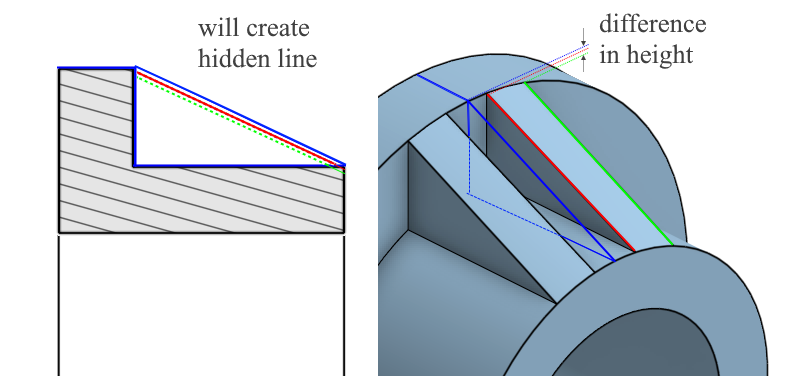
There is a real need for this hatch (rib) exclusion feature because editing technical drawings with AutoCAD to comply with ISO and ASME rules creates data that is disconnected from the solid model. Thanks for your time.
0 -
Evaluating the subject through the philosophy of standards is an interesting topic, thanks. Today, technical drawings have lost their manufacturing criterion feature, as you mentioned, but they still have to be official documents with paper and physical signatures. Patents and other official information exchanges are still not fully software-based.
Due to 2D technical drawings, AutoCAD still ranks among the top programs on the market. However, with 3D modeling and perhaps AI support, ISO/ASME standards could be implemented much more quickly in the very near future. So, even if not for human users, CAD programmers may have to add the hatch exclusion feature we mentioned for AI. :)
0 -
@seyozen I was only pulling your leg. I would love to have this as a feature but knowing what pain the developers went through at SoldiWorks in order to make this work (and it only works on really simple geometry) I know this is a major undertaking.
Senior Director, Technical Services, EMEA1 -
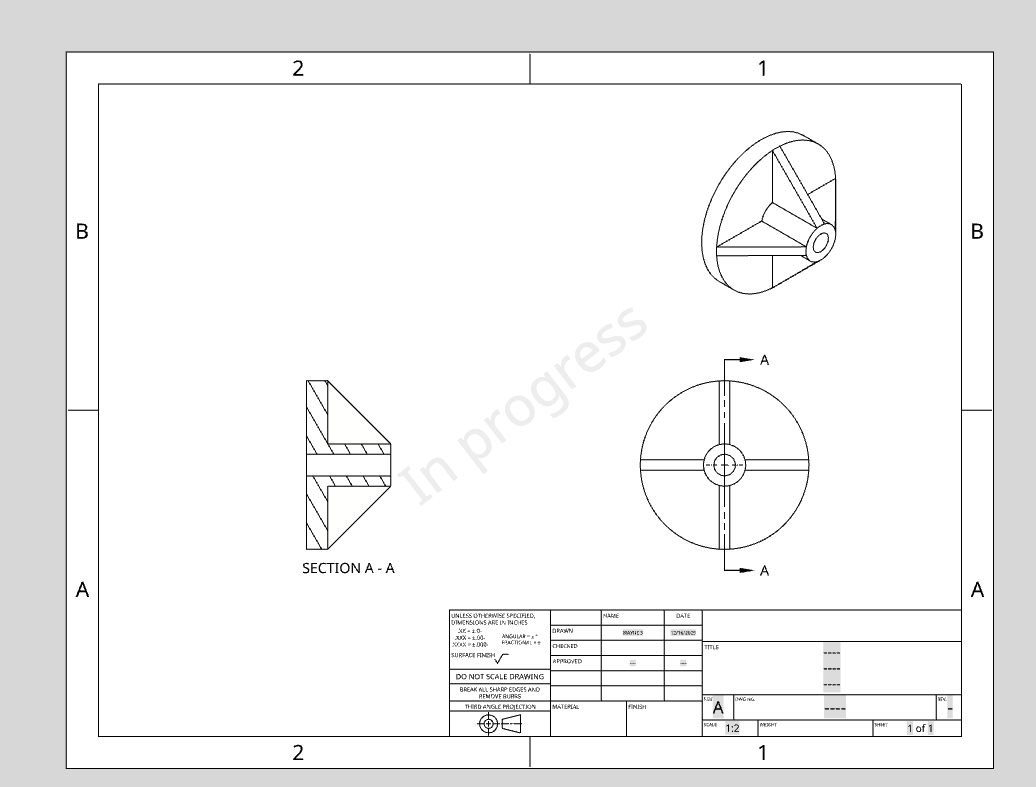
No need to go to AutoCAD. Do it manually in the drawing. Still disconnected from the CAD data
0 -
@eric_pesty funny enough I've run into enough cases of manufacturing miscommunication resulting from the .dxf file format itself that it's now in my pile of practices I hope to see die within my lifetime.
0 -
Dear @NeilCooke
🤗 It was definitely a well-engineered joke, but I still felt compelled to offer a humble explanation for the web community.
The absence of this feature in most programs, such as Inventor, which is equivalent to SolidWorks, indicates that it stems from both low demand and heavy programming load, you are right.
However, programmers should not view this issue solely as a complicated rib-exclusion. This exclusion is not only necessary for ribs; in short, we use it for uncommon discontinuous thin sections. In fact, the solution may be nothing more than a hatch edit. Perhaps a simple algorithm like the existing show/hide feature could be embedded into the hatch algorithm with just a regional modification. If the current “hatch region” can be selected regionally, with manually using the “adjust linestyle” commands could be enough. I don't think this would require a heavy programming load.
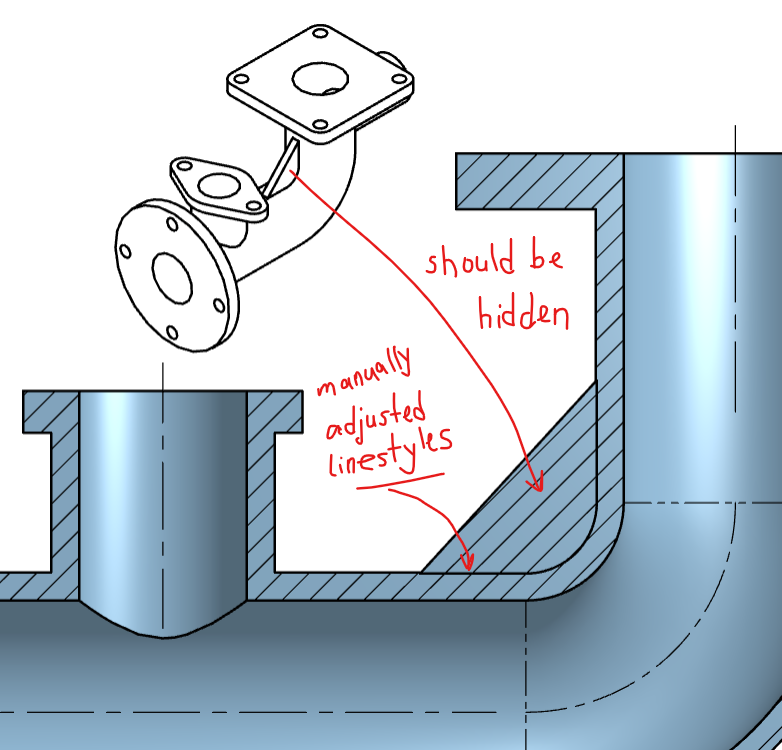
Edit: Yep I can create this rib as unmerged and I can hide the hatch. But this makes 3D models a little complicated as two bodies. For future operations such as FEM, CNC etc. this multiple body sulutions become problematic.
0 -
You are right. In SolidWorks, all it does is suppress the rib feature from the model, create the view, then unsuppress, which is why it is pretty much useless. IMO, all we need is the ability to hatch an area of a shown sketch. I think it is unreasonable to expect a 3D model to understand what is a thin feature for drafting purposes and it should be on the designer to define that.
Here is an example of a shown sketch, plus manually added geometry (which can be hatched).
Senior Director, Technical Services, EMEA1 -
I guess what I was trying to say was it made sense that this would be low priority and tying to make it work "automatically" seems like a waste of effort…
The current workaround is a bit clunky though so the ability to "split" the hatch region using "hidden lines" might be all that would be needed for those who really want to hide these.
0 -
@NeilCooke the day I learned that Solidworks drawings were secretly assemblies I started to notice the cracks in the foundation of a lot of drawing features. But I'd be lying if I said I never developed anything as hacky as that rib view implementation in my career.
0 -
We agree on everything. Actually, nobody wanted this to be automated; the general request was for it to be done manually. The solution in Solidworks isn't stable or fully automatic either; it still requires manual selection and is still very problematic especially on mirrored or array-duplicated features.
Therefore, the option to manually manipulate hatches and lines in the Drawing Module, which is our final solution, may be the definitive answer. In addition to the features already available in OnShape, a simple intervention like hatch-split or regional hatch-hide will solve the problem completely. I really feel sorry for the Solidworks team; they tried to do this in a 3D background.
I think the Sketch manipulation method you provided will also make things more difficult for complex parts. I hope for your support regarding the regional hatch-split-hide feature.
Thank you everyone for the valuable information shared on this topic. 🤗
1