Welcome to the Onshape forum! Ask questions and join in the discussions about everything Onshape.
First time visiting? Here are some places to start:- Looking for a certain topic? Check out the categories filter or use Search (upper right).
- Need support? Ask a question to our Community Support category.
- Please submit support tickets for bugs but you can request improvements in the Product Feedback category.
- Be respectful, on topic and if you see a problem, Flag it.
If you would like to contact our Community Manager personally, feel free to send a private message or an email.
Improvements to Onshape - January 18th, 2018

NeilCooke
Posts: 6,097 
Just two weeks since the last update! This update comes with some highly requested improvements to drawings, materials and custom features.



The new setProperty function can be used to set any part properties like Name, Part number or Description as well as material and appearance.
In this simple example, a custom feature added at the end of the Feature list can be used to set the name of a part. Because custom features can be configured, you can add each "segment" of the custom Part Number feature to a configuration table and build a new part number based on the configuration selected or variable value entered.

Please take a moment to try out these new features and improvements and leave your comments below. For a detailed list of all the changes in this update, please see the changelog.
Remember: The updates listed here are now live for all users when creating new Documents and over the next few days these features will also be available in Documents created before the date of this update.
FORESHORTENED RADIUS
Radial dimensions on large concave arcs can now be foreshortened to make your Drawings easier to read.ROTATE TEXT IN DRAWINGS
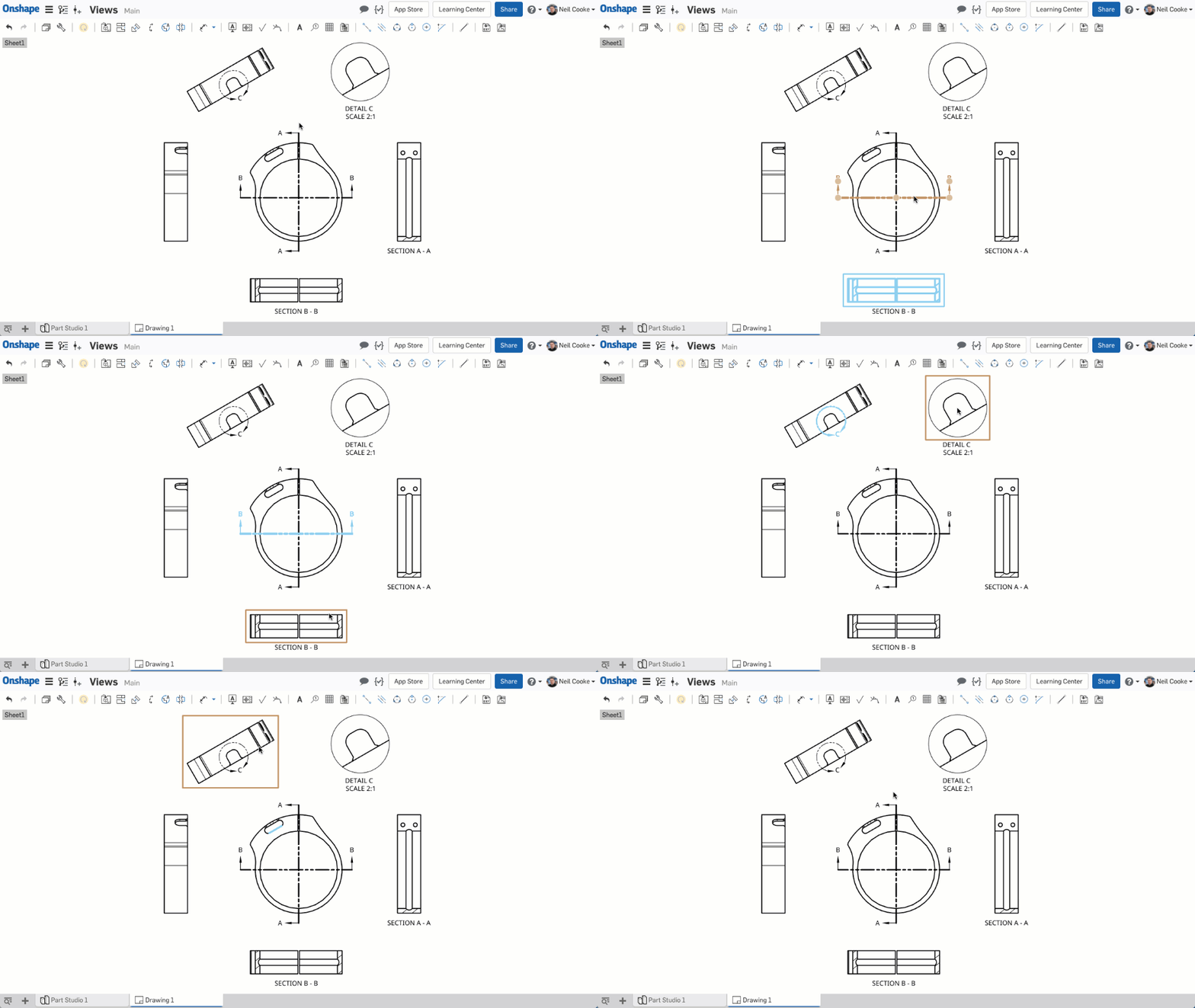
A new rotation drag handle has been added to notes without leaders.VIEW HIGHLIGHTING IN DRAWINGS
It is now much easier to discover which drawing view a section, detail or auxiliary view came from. The section line, detail circle or auxiliary projection line are now highlighted when you hover your mouse over the view and vice versa. COMPANY-WIDE MATERIAL LIBRARIES
A Company account administrator can now add company-owned material libraries to all user accounts. To enable this, go to "My account" under your profile icon in the top right corner, then "Company", then "Preferences".DRAG & DROP DOCUMENTS INTO FOLDERS
In the "My Onshape" filter on the Documents Page, you can now drag and drop documents and folders into other folders making it faster and easier to organize your Documents.IMPORTING SOLID EDGE FILES
You can now import Solid Edge part files (.par) and assembly files (.asm) from version 10 through ST10. To import an assembly, create a ZIP archive file containing all the parts and assemblies, then rename the ZIP file to be the same as the top-level assembly file (for example, if the top-level assembly is called water_pump.asm then your ZIP file should be called water_pump.zip). Then import the ZIP file and Onshape will create the correct assembly structure.EDIT PART PROPERTIES WITH FEATURESCRIPT
You can now edit part properties using FeatureScript. For example, if your custom feature creates a new part, like a spur gear, you can set its part name to be equal to the module and number of teeth.The new setProperty function can be used to set any part properties like Name, Part number or Description as well as material and appearance.
In this simple example, a custom feature added at the end of the Feature list can be used to set the name of a part. Because custom features can be configured, you can add each "segment" of the custom Part Number feature to a configuration table and build a new part number based on the configuration selected or variable value entered.
Please take a moment to try out these new features and improvements and leave your comments below. For a detailed list of all the changes in this update, please see the changelog.
Remember: The updates listed here are now live for all users when creating new Documents and over the next few days these features will also be available in Documents created before the date of this update.
Senior Director, Technical Services, EMEA
9
Comments
-
Sneaky Onshape peopleBusiness Systems and Configuration Controller
HWM-Water Ltd2 -
Well played. FS properties for the win as far as my vote goes.
Thanks folks,
Owen SBusiness Systems and Configuration Controller
HWM-Water Ltd6 -
Great additions
 2
2 -
Cool stuff
I was thinking just yesterday how I wanted a rotating text option for some flow arrows. Beat me to it this time onShape
Defiantly will take advantage of featurescript properties4 -
Nice One!!! I am looking forward to getting an FS try set part name, Part No., Description, Materials, etc. Lots of potential to improve workflows here taking away some of the retyping and cutting and paste at the end of a project which drives me crazy.2
-
Nice update guys. Keeping it agile!4
-
In the example for the part properties with FS,
Flange 3, Slot and Extrude 1 fail to regenerate when the config variables are: length: 100mm and Configuration: Left1 -
Purely awesome

I'm still adjusting my workflows with the last update and yet you have another package coming
Helpful updates for everyone, drag&drop streamlines document handling and drawing improvements ease up the general frustration of making drawings.
But company wide materials and using FS to edit part properties will be huge for certain user groups!
//rami1 -
@mbartlett21 thanks, fixed it. I just threw that example together without testing thoroughly. Props to @ilya_baran for the custom feature!Senior Director, Technical Services, EMEA1
-
Nice! Finally auto renaming parts with variables A few days ago I was looking for the improvement request and could not find it…
3 -
Foreshortened radius dimensions are awesome, this has been bugging me for a while. The view highlighting and drag and drop are going to be very useful. good work OS.3
-
Agreed! Just a few days ago I ran into issues with the radius dimensions, it's like OS staff is reading my mind!Ben_Bartlett said:Foreshortened radius dimensions are awesome, this has been bugging me for a while. The view highlighting and drag and drop are going to be very useful. good work OS.1 -
Solid Edge import!!!!!! My prayers to the Onshape gods have been answered!
Next step, ability to upload a Solid Edge sheet metal model and flatten it in Onshape.2 -
oh, no; I thought we were done with folders. Folders is a paradigm of the last century. The structure for organization that is future proof is tags.1
-
Yes indeed, and in onshape speak they're known as labels and work very well indeed, but for those that still wish to use folders they're available too.esben_stien said:oh, no; I thought we were done with folders. Folders is a paradigm of the last century. The structure for organization that is future proof is tags.
Owen SBusiness Systems and Configuration Controller
HWM-Water Ltd4 -
Just noticed for Solid Edge..... Onshape can open .par and .asm.......When will we see the ability to open .psm? This is the file extension for Sheet metal parts in Solid Edge.0
-
I've just been told that:
Onshape has been updated to address your ticket:"Show sketches in existing drawing views"
This update (1.74.20341.43fc8fee8221) has been pushed to cad.onshape.com and is live for all users of Onshape. This version is displayed at the bottom of the Documents page or by clicking the ? menu and selecting About.
I've got the update ok, but I can't find where this function has been placed. I've regenerated the drawing, and when I right-click over the view I'm not seeing anything like Show Sketch, not finding it any where else either. Any clues?0 -
-
@hans_haenlein I am not sure how that was closed.. Sorry about that. It is in the works. `LouLou Gallo
Sr. Director of Product Definition. UX and Support0 -
OK, thanks. I was excited there for a moment.0
-
En este enlace podéis ver las Novedades de Onshape en español
 https://www.youtube.com/watch?v=GWSvqshXr50
Un saludo,
Eduardo Magdalena C2i Change 2 improve ☑ ¿Por qué no organizamos una reunión online?
Partner de PTC - Onshape Averigua a quién conocemos en común2 -
If we follow the current trend of updates it has been 3 weeks and then 2 weeks, so next must be 1 week and zero weeks so that's 2 new releases tomorrow then, happy days.
OwS.
Business Systems and Configuration Controller
HWM-Water Ltd0 -
@owen_sparks obligatory: https://xkcd.com/605/Ilya Baran \ VP, Architecture and FeatureScript \ Onshape Inc3
-
@ilya_baran Nailed It0
-
@ilya_baran
Well played Sir. I was going with the poncy Latin "reductio ad absurdum" but like yours better
Cheers,ilya_baran said:@owen_sparks obligatory: https://xkcd.com/605/
Owen S.
Business Systems and Configuration Controller
HWM-Water Ltd0 -
@owen_sparks If you look closely to the dates, you can see that the update from 2nd January was 1 week too late and the update from 18th of January was just on time
 1
1 -
@sebastian_glanzner Santa needs a break every once in a while too : -)1
-
Santa gets 364 days of rest... Get back to work!john_mceleney said:@sebastian_glanzner Santa needs a break every once in a while too : -)
2 -
That's all right, the whole Onshape Team deserverd it!john_mceleney said:@sebastian_glanzner Santa needs a break every once in a while too : -)
I didn't knew that Santa is also working for Onshape
Now I understand how all these "Improvement Requests" and "Wishlists" work:
Only the "well-behaving" customers get their wishes granted in the next update
PS: Can I get a color switch in Onshape? Please? https://forum.onshape.com/discussion/8146/
0 -
Normally, Cody and I get a demo from the developers to show us everything they've been working on. Somehow, this one slipped through the cracks, but I thought it good enough to add an extra video. Enjoy!Senior Director, Technical Services, EMEA5







![[Deleted User]](https://w8.vanillicon.com/89b191becbe1bfbd78efe4619fd4f554_100.png)







