Welcome to the Onshape forum! Ask questions and join in the discussions about everything Onshape.
First time visiting? Here are some places to start:- Looking for a certain topic? Check out the categories filter or use Search (upper right).
- Need support? Ask a question to our Community Support category.
- Please submit support tickets for bugs but you can request improvements in the Product Feedback category.
- Be respectful, on topic and if you see a problem, Flag it.
If you would like to contact our Community Manager personally, feel free to send a private message or an email.
Texture (New Custom Feature!)

MichaelPascoe
Member Posts: 2,945 PRO
Texture (New Custom Feature!)
https://cad.onshape.com/documents/46897a2d60ade8dbb04077f3/w/23398bd91a932d1432a5d204/e/201138fdd8eee8cfcd2dcac1With Texture, you can create solid body textures by clicking a surface or face.
Use pre-loaded textures, or use your own custom texture, (See the tutorial gifs below).
This feature is a derivation of Surface Pattern by @maximilian_schommer (Onshape), Thanks Max!
Not familiar with custom features? How to add a custom feature to your toolbar
If you have any texture ideas you would like me to add to the standard library selection, feel free to comment below.
Let me know what you think! All feedback is appreciated.


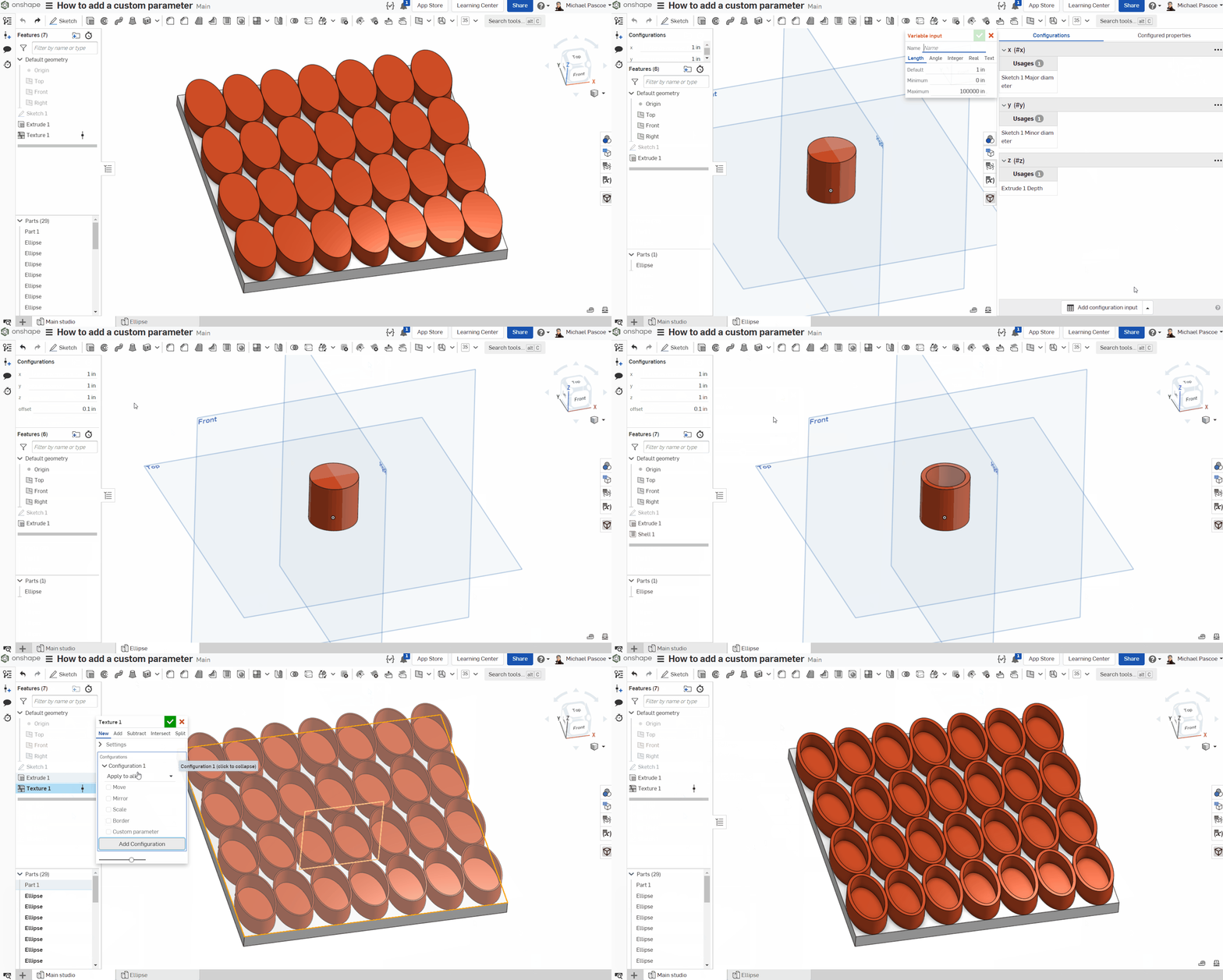
How to create a custom texture:
- Create a new part studio
- Add configurable variables x, y, and z
- Place the very center bottom of your part on the Top plane origin
- Constrain the x, y, and z of your part with the configurable variables x, y, and z.

Adding custom parameters:
- Inside your texture studio, create a configurable variable with any valid name that you like
- When you go to use your custom texture, click the "Add configuration" button
- Check the "Custom parameter" check box
- Type the ID of your custom parameter exactly
RENDERCAD
rendercad.ai - Photorealistic product rendering.
▚▞▚▞▚▞▚▞▚
________________________________________________________________________
Tagged:
15
Comments
-
Awesome script.
Texture ideas: Diamond plate, Expanded metal, and bar grating.

 4
4 -
Thanks! I will add them in the next update.
RENDERCAD
rendercad.ai - Photorealistic product rendering.
▚▞▚▞▚▞▚▞▚
________________________________________________________________________3 -
Looks awesome! Diamond plate, and various more wood plank options would be sweet. Great update either way!2
-
-
Thanks for sharing, Michael! I'm pumped about this one. Your feature announcements are getting pretty elaborate too. Skillz!1
-
Very cool! Can't believe this is working
 2
2 -
Wow.
1 -
Thanks for the feedback everyone. Here is an update for you. Keep the ideas coming!Update!
https://cad.onshape.com/documents/46897a2d60ade8dbb04077f3/w/23398bd91a932d1432a5d204/e/56e5d6543ccb1f14cf1c4a46New Textures
Requested by: @bryan_lagrange & @Brendan_Leipelt- Bar grating
- Diamond plate
- Expanded metal
- Wood plank (2)
- Wood plank (3)
Feature Improvements
- Quick mode: Up to 10x faster than dynamic mode. Limited configurations and surface compatibility.
- New config menu layout (tab style): Move, Mirror, Scale, Other
- Sort buttons for scaling. These let you sort through: Auto scale and equal x, y, z.
- Configuration added "delete part".
- Warning message for same studio textures: "Same studio textures have limited functionality."
- Scale Z preset values. Some textures with real life dimensions will now default to a realistic value.
- Same studio, part will only auto scale if you configure it to do so.
- Add, will now add parts to each other if no merge scope is selected.
- Code improvements, Thanks for the tips @Alex_Kempen
Bug fixes
- Custom texture same studio is working again. (Remember, same studio textures will not instantiate. This means that the part will be stretched instead of re-calculated. Please see the tutorial gif above on how to properly create custom textures)
Quick mode
Currently this mode works best for flat surfaces.
New config menu (tab style)
This is a tab menu, not a tab selection. This means you can go back and forth between the different tabs to change settings like a standard tab style menu.
Sort buttons
By default, the textures use auto scaling. If you click scale, auto scaling will be turned off and the part size will not update with your surface size unless you specify "Auto scale" with the sort button.
RENDERCAD
rendercad.ai - Photorealistic product rendering.
▚▞▚▞▚▞▚▞▚
________________________________________________________________________4 -
Oh that's cool
0 -
Just did these 3 examples of expanded metal, bar grating, and diamond plate. Awesome feature script @MichaelPascoe


 3
3 -
Working on some bead board walls today:

RENDERCAD
rendercad.ai - Photorealistic product rendering.
▚▞▚▞▚▞▚▞▚
________________________________________________________________________4 -
3
-
@bryan_lagrange That's legit!
RENDERCAD
rendercad.ai - Photorealistic product rendering.
▚▞▚▞▚▞▚▞▚
________________________________________________________________________0 -
Today's special: A reception desk with perforated brass panels.

RENDERCAD
rendercad.ai - Photorealistic product rendering.
▚▞▚▞▚▞▚▞▚
________________________________________________________________________4 -
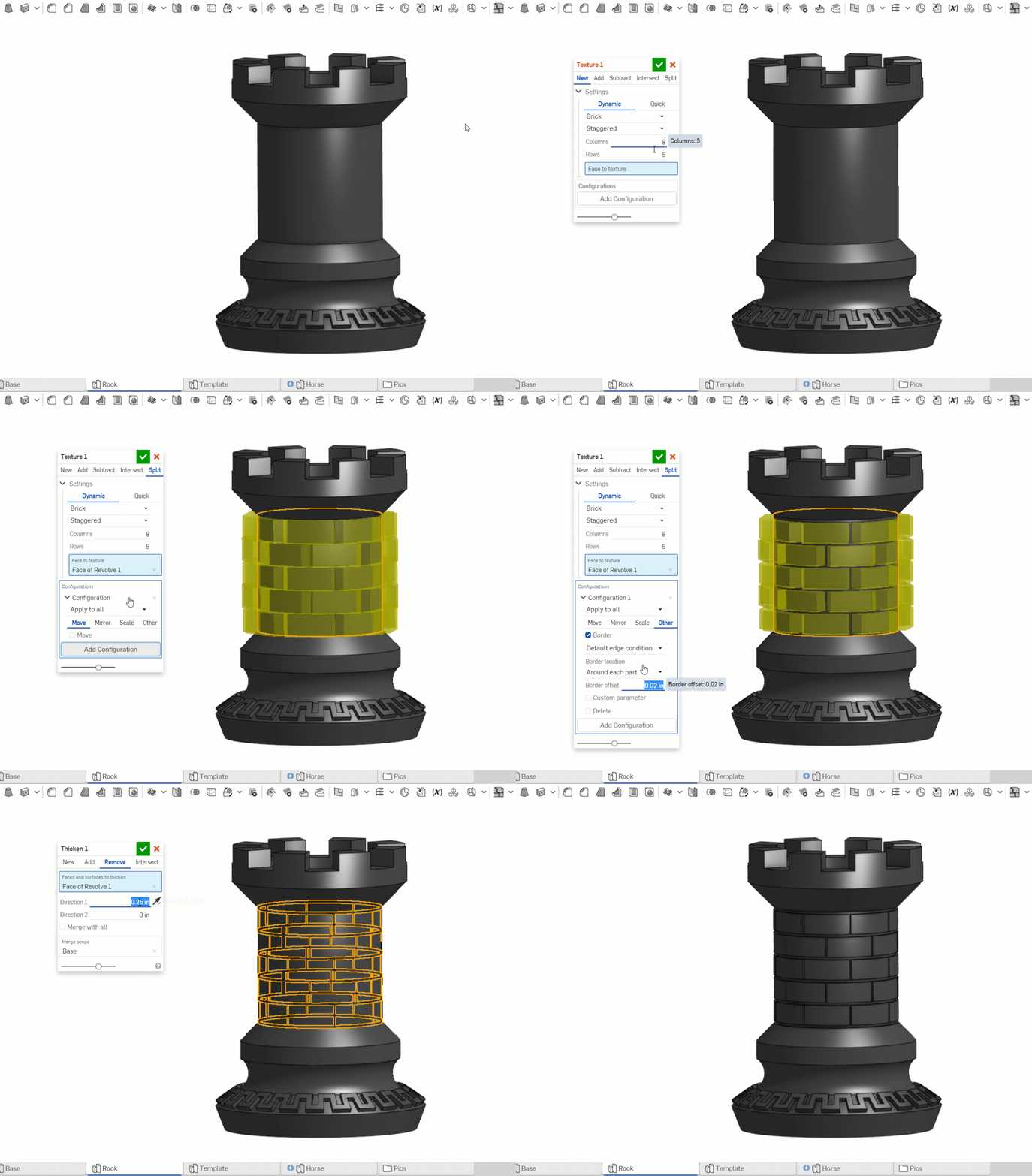
Working on some Christmas gifts:
RENDERCAD
rendercad.ai - Photorealistic product rendering.
▚▞▚▞▚▞▚▞▚
________________________________________________________________________6 -
-
Love it1
-
WOW!
I would like to see what you are doing with the knight.www.accuratepattern.com1 -
Nice1
-
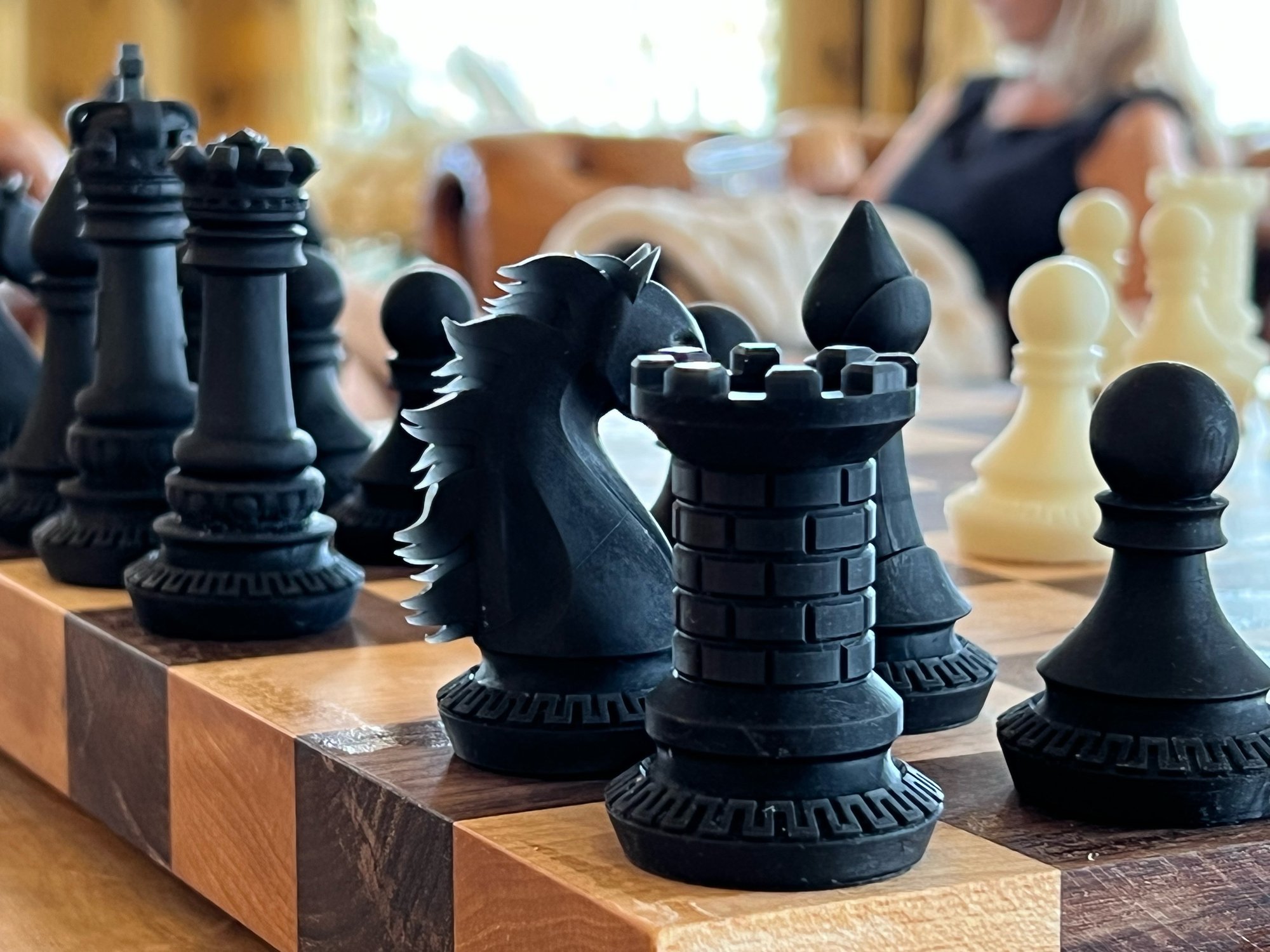
Finished the set Christmas Eve. The pieces are resin prints with an Elegoo Mars 2 Pro. The board is solid Black Walnut and Maple.

RENDERCAD
rendercad.ai - Photorealistic product rendering.
▚▞▚▞▚▞▚▞▚
________________________________________________________________________13 -
nice dang work, Michael!
2 -
How do I get it to subtract properly?
I am using a custom texture sized exactly to the face (1x1), and when I select "Subtract" it shows the geometry changes in Yellow, but nothing happens when I confirm the texture.
I can successfully "Add" the texture to the part, but not subtract.0 -
@james_garrison If the subtraction fails, it will give you the preview but not subtract anything. If you share a link to your document, I will help troubleshoot it for you.
Without seeing the document, here are a few things you could try:- Use the move "configuration" from within the feature to move the part so that it doesn't completely go through your targeted merge scope.
- Scale the part down a small amount so that there are no accidental shared vertices.
RENDERCAD
rendercad.ai - Photorealistic product rendering.
▚▞▚▞▚▞▚▞▚
________________________________________________________________________0 -
I believe I got it to work by selecting the "Quick" function
Is there a way to apply Textures to a cylindrical item with "Remove"?
It just tries to take a slice off where the texture intercepts0 -
@james_garrison
Yes, this should work. If you provide a link to the document, I will troubleshoot it for you.
RENDERCAD
rendercad.ai - Photorealistic product rendering.
▚▞▚▞▚▞▚▞▚
________________________________________________________________________0 -
 Crazy tool! This is incredible! thanks a loooooot!!!
1 -
OMG! This is truly amazing! All my aluminum diamond plate rending dreams just came true!2
-
Glad you like it! Improvement ideas?
RENDERCAD
rendercad.ai - Photorealistic product rendering.
▚▞▚▞▚▞▚▞▚
________________________________________________________________________2 -
This is Awesome @MichaelPascoe I cannot wait to try it out. I will post a finished product once I get it implemented!
2 -
Is it possible to add an image as a texture?MichaelPascoe said:Glad you like it! Improvement ideas?2