Welcome to the Onshape forum! Ask questions and join in the discussions about everything Onshape.
First time visiting? Here are some places to start:- Looking for a certain topic? Check out the categories filter or use Search (upper right).
- Need support? Ask a question to our Community Support category.
- Please submit support tickets for bugs but you can request improvements in the Product Feedback category.
- Be respectful, on topic and if you see a problem, Flag it.
If you would like to contact our Community Manager personally, feel free to send a private message or an email.
Improvements to Onshape - September 28th, 2018

cody_armstrong
Moderator, Onshape Employees, Developers, csevp Posts: 228 
It's update time again! This update has a heavy focus on improvements to performance and drawings. Let's jump in.



Please take a moment to try out these new features and improvements and leave your comments below. For a detailed list of all the changes in this update, please see the changelog.
Remember: The updates listed here are now live for all users when creating new Documents and over the next few days these features will also be available in Documents created before the date of this update.
CAD IMPROVEMENTS
DRAWING SECTION VIEW PERFORMANCE IMPROVEMENTS
The performance of large assembly section views has been improved with this update to Onshape Drawings. To do this, we've used our architecture in a unique way to generate section views concurrently.STANDARD CONTENT IMPROVEMENTS
All standard content inserted into the assembly will now have an automatically generated name and description that includes details like the size, length, etc.ADDITIONAL DRAWING PROPERTIES
Additional drawing properties have been added to the Drawing Properties flyout. These new properties allow you to set the line thickness, color, and more of section view lines, detail view circle lines, break lines, flat pattern view lines, center marks, sketch geometry, and more.IMPORT INTO FOLDER
You'll find a new menu option to import when right-clicking a folder in the tab manager. This is especially useful if you typically stored imported files in folders as it allows you to import files straight to a folder.THUMBNAILS FOR IMPORTED DXF, DWG, AND DWT FILES
You will now see thumbnail images for imported DXF, DWG, and DWT files.IMPROVED TABLE DRAG BEHAVIOR IN ONSHAPE DRAWINGS
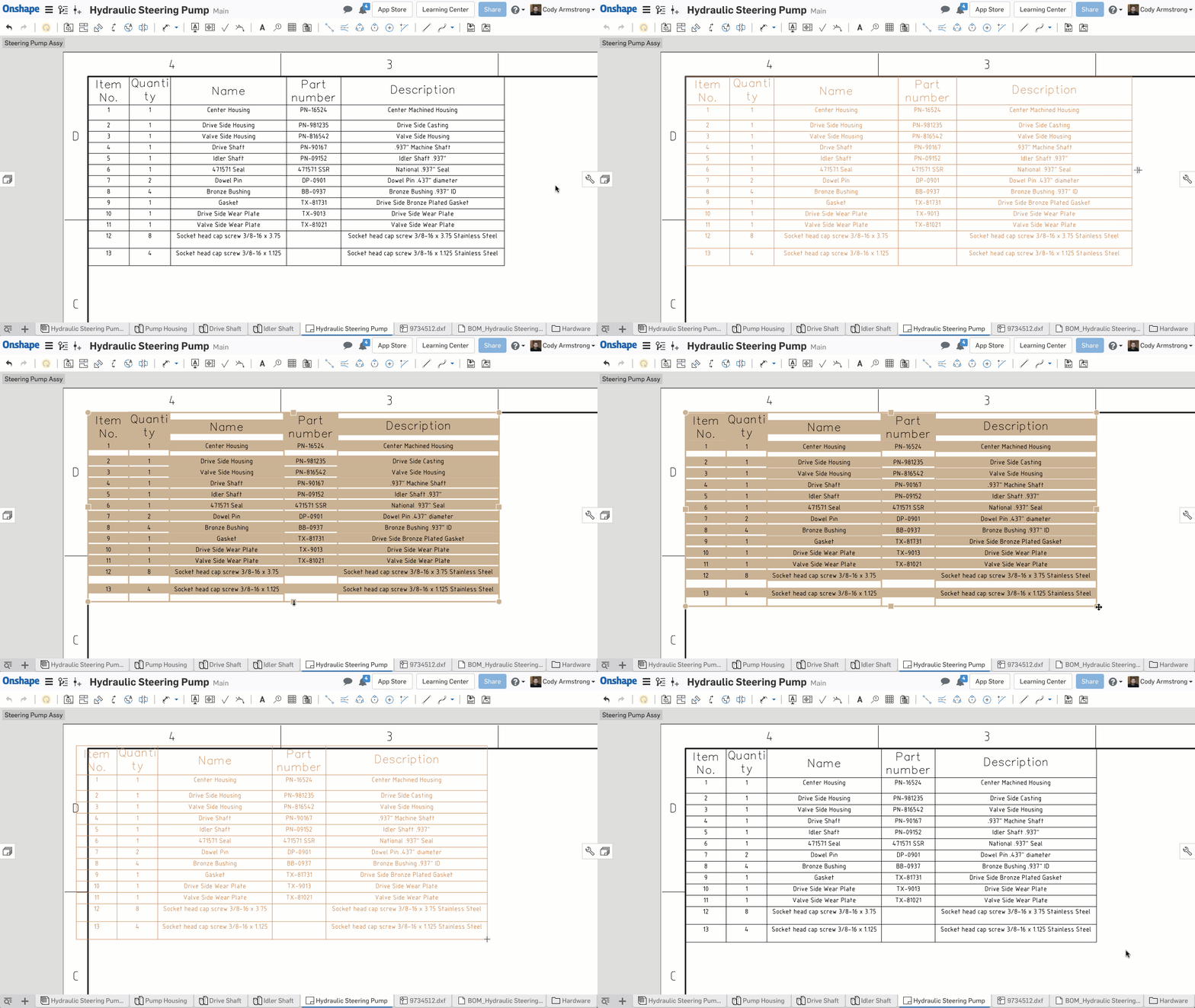
The drag behavior of tables in Onshape Drawings has improved with this update. Dragging by the middle grip points will resize the table, and dragging one of the corner grip points will move the table.SUPPORT FOR DIN STANDARD IN HOLE FEATURE
The DIN Standard is now a supported standard when creating holes using the Hole Feature.DERIVED FEATURE IMPROVEMENTS
In the past, the hide/show state of a derived feature was taken from the source. Meaning if you insert a part as derived, then hide the source part, it would also be hidden in the derived part. This behavior has been changed. When inserting derived features now they will maintain the hide/show state that they were originally inserted with.PROFESSIONAL FEATURES
DELEGATE APPROVAL
With Onshape Professional, you can now delegate approvals to others. This is great if you are away from your desk and want any approvals to automatically go to someone who is available.Please take a moment to try out these new features and improvements and leave your comments below. For a detailed list of all the changes in this update, please see the changelog.
Remember: The updates listed here are now live for all users when creating new Documents and over the next few days these features will also be available in Documents created before the date of this update.
2
Comments
-
DRAWING SECTION VIEW PERFORMANCE IMPROVEMENTS
"The performance of large assembly section views has been improved with this update to Onshape Drawings. To do this, we've used our architecture in a unique way to generate section views concurrently."
When I read this I immediately was thinking - "Yea, but how did the performance improve and how was it acheived?" - And the video answered it and love this technology (it's beautiful) that's able to be harnessed which will only grow in raw-power and parallelism for not only this, but "hopefully" other large assembly processing requirements.2 -
Great List of Improvements. Both the standard content names and the table improvement are simple but will make my life easier, both have been things I have been desiring over the last week as I've been creating drawings. I also welcome any improvements to speed and looking forward to creating my next section view.1
-
The Standard Content goes without saying - Thanks for this improvement.
I've always thought doing a competitive analysis (subjective to be sure) of drawings that UG/NX and SolidEdge produced by default great looking drawing/section views, Notes and Tables. The "Table" behavior's were also always better than SW in my opinion. These are the things that I'm excited the Onshape team is noticing, developing and deploying on time! 3
3 -
I'm just thinking out loud here... but I really can't emphasize enough how much the Onshape's from the start foundation built/developed/deployed on the cloud of massive compute-power and new software algoritm's to take advantage of this will mean a year from now, five years from now... or just 3 weeks from now
I've mentioned this before about not being able to compare the difference in versions. That being said, I think Onshape should leverage performance gains and give users an area where they can see the difference; this is huge guys/gals... It's what I would like to know and newer'ish users are looking to see so they can start to their transition to the "future of CAD". A statistical delta for the change in "their data sets" and time being saved. An enterprise issue to be sure,but hopefully something for PRO users too.
Again - These 3 week improvements are going to add up to a lot in a year or 5; can't even imagine 10 yet as my brain tends to stay linear verses exponential.


0 -
Very glad to hear about section views

I have been re-modeling feature for feature, the project I have been nagging about in Solidworks for the last few months into Onshape.
Just to have a side by side proof for my boss's that Onshape would have been the better choice for performance and collaboration (I lost the debate in the project kickoff meeting, Time to put the proof in the pudding)
Well its been over 700 hours of modeling on this project, and section views in SW are a very slow process.. (an hour to create the view and add a hand full of reference dims, about 20-30 minutes to open the file, about 10 minutes to save the file)
I was hoping to see how Onshape handled the same model once I got it all drawn up naively. Now that you did the major performance update to Sections, I hope this really helps drive the point home for them Onshape is the real deal. Onshape already opens the main assembly in 1/100th time SW does Although my galaxy note8 wont open the main assembly without crashing; at least the imported packandgo.zip import won't.. oh well, good thing I'm not modeling on the phone 
Can't wait to put the final model through the endurance test when I start re-creating installation drawings 0 -
👍👍👍.
still need an option of custom section depth. I will say goodbye to SW if this feature added.2 -
Good work guys, and thanks also for the glimpse into how it works not just what is does

Owen S.Business Systems and Configuration Controller
HWM-Water Ltd3 -
Thanks, I've been waiting for the Standard Content improvements - I use a lot of fasteners so an accurate and complete BOM is very important. However, it seems that while diameter-pitch-length data works as advertised for socket cap screws, no such data appears for ISO button head screws.
0 -
Hi bill_daniels,bill_daniels said:Thanks, I've been waiting for the Standard Content improvements - I use a lot of fasteners so an accurate and complete BOM is very important. However, it seems that while diameter-pitch-length data works as advertised for socket cap screws, no such data appears for ISO button head screws.
Over last night we noticed that there were 6 pieces of content that our approach we took to disambiguate was not going to work based on the standards. We are working to fix it right now.Jake RamsleyDirector of Quality Engineering & Release Manager onshape.com2 -
@jakeramsley
I'm pretty sure we'd all forgive you if you left it until after the weekend to fix it. The fact you're doing it now speaks volumes to your commitment to quality.
OwS.Business Systems and Configuration Controller
HWM-Water Ltd3 -
Hi bill_daniels,bill_daniels said:Thanks, I've been waiting for the Standard Content improvements - I use a lot of fasteners so an accurate and complete BOM is very important. However, it seems that while diameter-pitch-length data works as advertised for socket cap screws, no such data appears for ISO button head screws.
These should all be fixed now and have auto-naming included for any new standard content added. If you have any other issues, please submit a ticket to our support.Jake RamsleyDirector of Quality Engineering & Release Manager onshape.com2 -
Fantastic response! Weekend too! Just one quibble. Apparently, the ability to edit the description of Standard Content in the BOM table has been lost. Previously, I had used the description field for size data but now with size data in the item name, I'd like to use it do describe where the Standard Content goes in the assembly.
0 -
Hi @bill_daniels,
Can you please post a screenshot of what you are seeing? I am able to edit the description of inserted standard content, but the name is uneditable (as it should be).
Best,
Mike0 -
Unfornataley Bill, I think you will find the description will propagate across all your instances where that part is used in that assembly and others you own too, so not ideal for an assembly based description of a part location.bill_daniels said:Fantastic response! Weekend too! Just one quibble. Apparently, the ability to edit the description of Standard Content in the BOM table has been lost. Previously, I had used the description field for size data but now with size data in the item name, I'd like to use it do describe where the Standard Content goes in the assembly.0 -
@john_mcclaryjohn_mcclary said:Very glad to hear about section views
I have been re-modeling feature for feature, the project I have been nagging about in Solidworks for the last few months into Onshape.
Just to have a side by side proof for my boss's that Onshape would have been the better choice for performance and collaboration (I lost the debate in the project kickoff meeting, Time to put the proof in the pudding)
Well its been over 700 hours of modeling on this project, and section views in SW are a very slow process.. (an hour to create the view and add a hand full of reference dims, about 20-30 minutes to open the file, about 10 minutes to save the file)
I was hoping to see how Onshape handled the same model once I got it all drawn up naively. Now that you did the major performance update to Sections, I hope this really helps drive the point home for them Onshape is the real deal. Onshape already opens the main assembly in 1/100th time SW does Although my galaxy note8 wont open the main assembly without crashing; at least the imported packandgo.zip import won't.. oh well, good thing I'm not modeling on the phone
Can't wait to put the final model through the endurance test when I start re-creating installation drawings
If possible, can you open a support ticket for the galaxy note8 crash? Thanks0 -
Ticket sentPaul_J_Premakumar said:
@john_mcclaryjohn_mcclary said:Very glad to hear about section views
I have been re-modeling feature for feature, the project I have been nagging about in Solidworks for the last few months into Onshape.
Just to have a side by side proof for my boss's that Onshape would have been the better choice for performance and collaboration (I lost the debate in the project kickoff meeting, Time to put the proof in the pudding)
Well its been over 700 hours of modeling on this project, and section views in SW are a very slow process.. (an hour to create the view and add a hand full of reference dims, about 20-30 minutes to open the file, about 10 minutes to save the file)
I was hoping to see how Onshape handled the same model once I got it all drawn up naively. Now that you did the major performance update to Sections, I hope this really helps drive the point home for them Onshape is the real deal. Onshape already opens the main assembly in 1/100th time SW does Although my galaxy note8 wont open the main assembly without crashing; at least the imported packandgo.zip import won't.. oh well, good thing I'm not modeling on the phone
Can't wait to put the final model through the endurance test when I start re-creating installation drawings
If possible, can you open a support ticket for the galaxy note8 crash? Thanks0 -
Great job again!Don't forget Onshape users to look at the changelog to discover many other useful improvements!My favorites:Keep the ball rolling Onshape! (-:
- Standard Content Improvements
- Improved Table Drag Behavior In Onshape Drawings
- New incremental tessellation loading in Part Studios (similar to Assemblies)
- Drawing Section View Performance Improvements
- Import Into Folder
- Expanded Drawing property options for views
- Auto jog ordinate dimensions in Drawings to avoid overlap
- Fixed note text display in some custom templates
2 -
ADDITIONAL DRAWING PROPERTIES are a really great improvement!!
there is only one more thickness that I would like to set, the thickness of the quotations lines!!
will it be possible to configure that too?0 -
Mike, I was not precise in my description. I CAN edit the description - but it doesn't "stick". When I leave the BOM then return, the edit is gone. Bruce is correct, once a description is entered, it seems to propagate across all assemblies. This is not as helpful as it could be. The description should be unique to one assembly/BOM so the description can describe the where, what etc for the standard content.
0 -
bill_daniels said:Mike, I was not precise in my description. I CAN edit the description - but it doesn't "stick". When I leave the BOM then return, the edit is gone. Bruce is correct, once a description is entered, it seems to propagate across all assemblies. This is not as helpful as it could be. The description should be unique to one assembly/BOM so the description can describe the where, what etc for the standard content.Throwing my voice in here.To me a description (of a part) should propagate, as it describes the part itself, not it's particular use in this assembly. If I wanted something specific to "this" instance of the part in question then I'd be looking for a custom property of the part. Oh damn, that would be the same wouldn't it, as it's a part property? Erm, custom column labelled "notes" in the BOM?OwS.Business Systems and Configuration Controller
HWM-Water Ltd1 -
Ok... so "just for fun" I started to look to see if I can notice any difference with a drawing that has a couple section views and takes a long time to update. I deleted the section views and the wheel started spinning only to find out it did still seem to take a while for this somewhat small assembly (only ~30 unique parts which is rather small still).
I replayed the video and it says that "Multiple Part Studio's are processed at the same time".
I opened up the file that was done from an intern over the summer learning Onshape only to see this! That being said that's actually how I too started building Part Studio's of a product since all the parts are technically related. This file is unmanageable to me looking at it since I didn't model and it can't utilize the any performance benefits unless I'm mistaken. I have a feeling a lot of users will be running into this issue and new ones in the future.
I would sure love some functionality or a tool like this right now.
https://forum.onshape.com/discussion/10004/extract-parts-and-its-features-to-a-new-document#latest
0 -
Damn, again some update - just installed one few weeks ago.. Surely it's gonna break something, maybe I'll just skip this one.. Oh no wait, it's ONSHAPE update - wohoo - can't wait to get into new features they pushed in this time
 //rami5
 -
I think description that holds data for assembling a part should be owned by BOM or assembly (which are pretty much the same in Onshape), not part. Part data is data about that specific part and it should propagate to anywhere that part appears. IMHO.//rami2
-
Un saludo,
Eduardo Magdalena C2i Change 2 improve ☑ ¿Por qué no organizamos una reunión online?
Partner de PTC - Onshape Averigua a quién conocemos en común3 -
Very nice.
Thank you Onshape team!2 -
@owen_sparks
I see you have been on the forum most of the day, but haven't posted anything...
Can I believe you are doing the same thing I am? There were a hand full of Onshape employees earlier, but now they are gone probably ain't gonna happen today is it
1 -
-
attaboy0
-
Think chrome is mad at me

5 -
Business Systems and Configuration Controller
HWM-Water Ltd1










 https://youtu.be/CIkbWXmKmLw